SEO-friendly website design starts with agreeing on what the site needs to communicate and how people and search engines will access it. This guide covers the decisions to make with your brand agency, who should own them, and the evidence to ask developers for before launch. It also explains what to check once the site is live.
Key takeaways
- Set search requirements before detailed design begins, while the agency takes care of the content your audience needs
- Give design and development clear SEO requirements, with one person accountable for resolving decisions between teams
- A staging test can uncover implementation problems; it can’t prove how Google will index the live site or how real visitors will experience it
What makes a website design SEO-friendly?
SEO-friendly website design helps visitors and search engines find your important pages and understand their content. That means planning clear navigation and leaving room for essential explanations as readable page text, even when the design uses animation or interactive elements.
Developers then need to make those features work on the finished site. These choices remove preventable barriers, but they don’t guarantee indexing or rankings. Content quality and relevance still matter.
Putting these principles into practice takes coordination between your brand agency, developers, and content team. Before detailed design begins, specify what each team will deliver and who will check the finished work.
Define what your design, development, and content teams will deliver
Include each team’s responsibilities and the evidence they’ll supply in the project scope. Use this table to make the deliverables explicit.
Even if one agency handles several parts of the project, make it clear who sets each requirement, who does the work, and who signs it off. Tell the agency what visitors need to understand and do on each page, then give it room to decide how the design supports those needs.
Design decisions that affect search visibility
Review the templates and components the project actually uses. A requirement for a carousel applies if the design includes one; it isn’t a request to add a carousel. The aim is to make the chosen design work.
1. Keep important pages reachable through clear navigation
Navigation determines which pages receive a visible route from the rest of your site. Before approving a shorter menu, ask your content and SEO lead which product and use-case pages need to remain discoverable.
Review resource pages too, and agree where their links will go.
This is because a page doesn’t need to appear in the main menu to be useful, but it should include relevant internal links to help Google understand your website architecture.
Ask the design partner to show the planned page hierarchy and navigation labels. They can also demonstrate working, crawlable links on a representative desktop and mobile menu, just so you can see how your site will talk to themselves based on your existing content.
2. Leave room for product explanations and supporting proof
SEO-friendly website design can stay highly visual while claims and supporting proof remain editable page text. Keep the explanations that give them context editable too.
A result embedded in a graphic becomes a design ticket every time the number changes. A live-text result block lets your team update the figure and its context together.
Ask the design partner to show the product and resource templates with real copy at its shortest and longest. Include a long product name and a qualified customer claim. Test a resource title that needs more than one line too. These examples reveal whether the layout works beyond the sentence used in the presentation.
In this hypothetical product section, the visual shows a workflow. The text beside it explains the workflow, so visitors don’t have to interpret the graphic to understand the product.
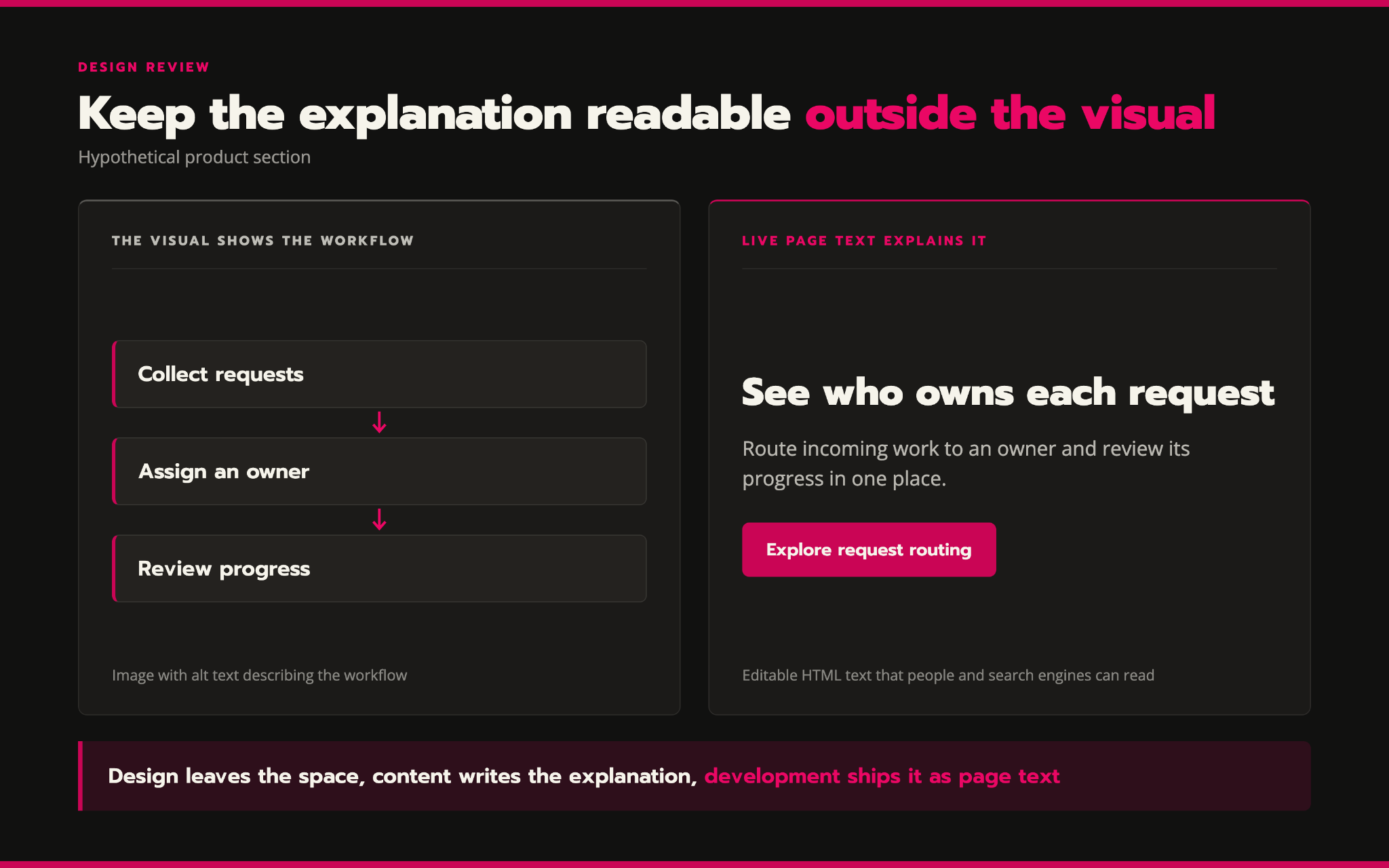
Keep the product explanation visible on the page, where visitors can read it. Use alt text to describe the image, rather than putting the full explanation there. Google also recommends keeping important content in text form for its AI search features, though that doesn’t guarantee your page will be cited.
3. Keep important content available on mobile
Mobile design can rearrange content without removing the information that makes the page useful. Google uses the mobile version of your site for indexing and ranking. If you remove useful content to make the mobile page easier to scan, Google may miss information that helps it understand the page.
Ask your designer to show how a product page changes on a phone. If a section takes up too much space, visitors could tap a heading to read more. This keeps the page shorter without removing information they may need.
4. Check what visitors can understand before they click
If your page uses tabs for different audiences, keep any message that applies to everyone above the tabs. For example, explain the product’s overall benefit first, then use the tabs to show how it helps marketing, sales, or operations teams.
Ask your developer to check how the content inside those tabs loads. Text that’s already on the page and revealed by a click is different from text downloaded only after that click. Google doesn’t interact with the page to load it, so important explanations and links should be available without that action.
For animations or interactive demos, ask the designer to show what visitors will see before playback starts and if the feature fails to load.
5. Plan how video, images, and embeds will load
Discuss how hero video and animation will load before the design becomes a commitment. Fonts and third-party embeds need a delivery plan too. The key question is whether the team can deliver the intended experience on representative devices while meeting the agreed performance targets.
Turn the performance plan into specific requests:
- Ask design for intended media dimensions and approved crops. Request video poster images and static alternatives to motion too
- Ask development to serve appropriately sized assets and reserve space for media and embeds before they load
- Test with the real consent banner and analytics. Include chat and video tools too, so the demo reflects the production site
Developers can defer a heavy video player until someone chooses to play it. The main hero image needs different treatment: Google advises against lazy-loading the LCP image.
You should also use controlled tests during development, then monitor real-user performance after launch. Lab and field data answer different questions: one tests chosen conditions; the other reflects actual visits.
Core Web Vitals contribute to Google’s ranking systems, but passing them doesn’t guarantee rankings.
6. Make routine content changes possible in the CMS
An SEO-friendly website needs to stay editable after launch. Your team will update titles and descriptions, then revise headings and supporting proof as the product changes. Those updates shouldn’t require reopening the page design each time.
Ask the build partner for a short CMS demo using a representative product page. You can also get someone from your marketing team to change its title and heading, then edit the description and supporting copy. Ask them to update alt images too, then preview the result on mobile to see the actual page output.
Google also recommends distinct, descriptive page titles. The title tag and the visible page heading can be edited separately where needed. Heading styles should also map to a meaningful structure, rather than requiring writers to choose a font size and hope it represents a heading. This can help people navigating your website with assistive technology understand its content.
Finally, give URL changes and indexing controls a deliberate approval path. Editors need a way to request or manage them, but changing a published slug or marking a page noindex shouldn’t be an accidental consequence of a routine copy edit. Ask who reviews those changes and who implements any redirect.
7. Decide which existing URLs to keep, redirect, or retire
The URL map is a content decision before it’s a technical one. Someone has to decide which old pages stay and which merge into another. Pages with no continuing purpose may need to retire. The new design should follow those decisions rather than quietly making them through a smaller set of templates.
Start with an inventory of pages attracting organic visits and useful links. Include pages that generate qualified inquiries too. Ask your SEO lead to explain the purpose of each important page before removing it. Keep established URLs where there’s no reason to change them.
Where a change is necessary, Google recommends permanent redirects to the relevant new destinations. A moved page should lead directly to its replacement, rather than through a chain. Several consolidated articles can point to their relevant combined replacement; unrelated retired pages shouldn’t all point to the homepage. A removed page with no suitable replacement can return a proper 404 or 410 response.
Ask the SEO team to approve the mapping and the build partner to test its implementation. Update internal links and canonical references to the intended URLs. Revise the XML sitemap to match.
What to check before and after launch
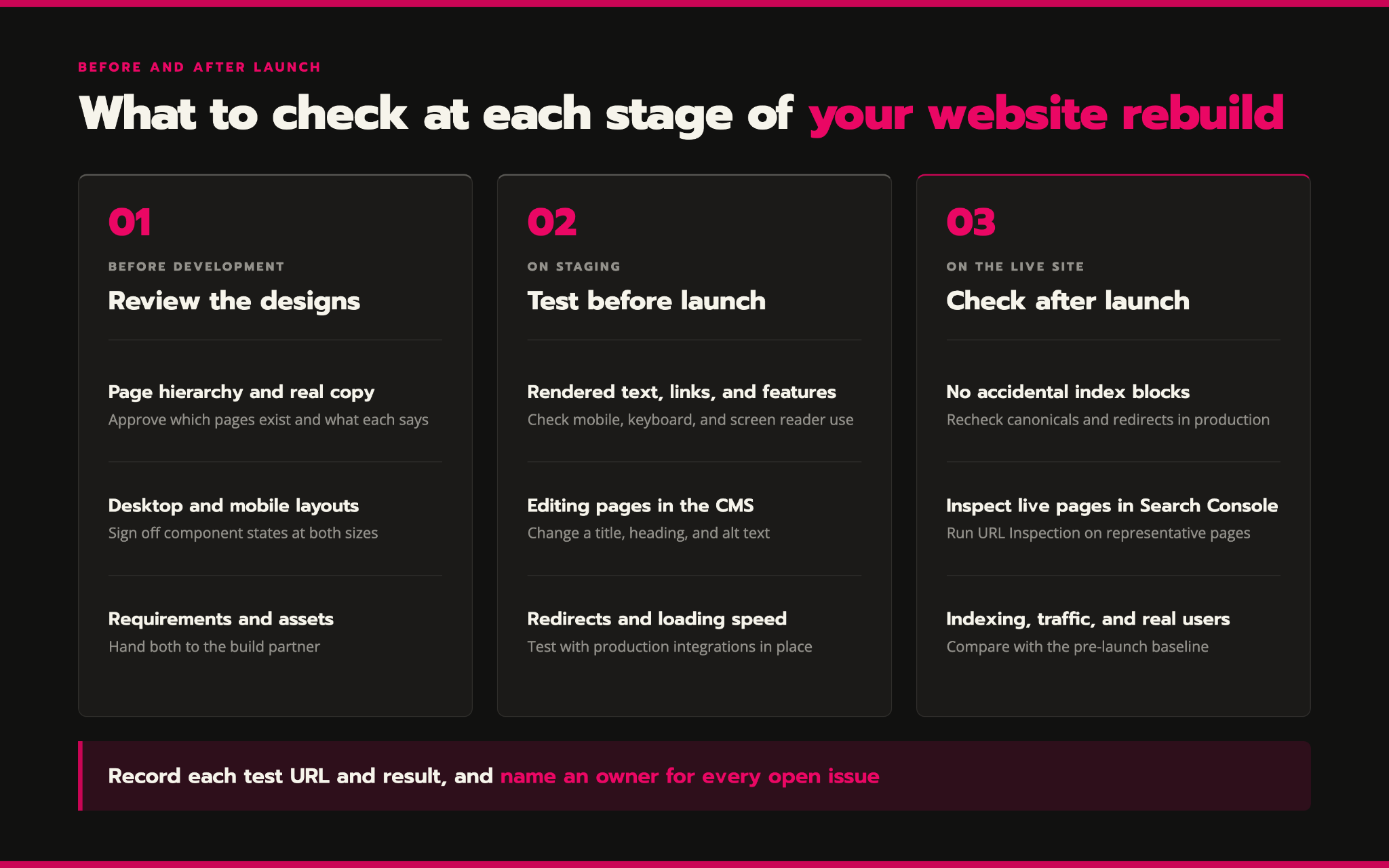
Once you’ve agreed on the requirements, review the work at three stages: the designs, the working site before launch, and the live site. Start by checking the content and layouts, then test whether the pages work as intended. After launch, confirm that Google can access them and monitor their performance.
1. Review the designs before development starts
Approve the page hierarchy and representative copy, then review the desktop and mobile layouts. Sign off on the required component states as well, and record any unresolved claims as decisions for your team, along with any questions about adding or retiring pages.
Before rebuilding the website, hand over the agreed requirements and visual assets. Confirm that the build partner will produce optimized image variants from the supplied sources, unless the contract assigns that work elsewhere.
2. Test representative pages on staging
Ask for a product page and a resource page. Include any unusually interactive template in the review too, and test them with realistic copy and production integrations.
You should also check that rearranged sections still make sense with a screen reader, interactive controls work with a keyboard, and animations respect reduced-motion settings.
The SEO lead and developers should demonstrate rendered content and links, then show how the templates behave on mobile. Review CMS output and redirects, and discuss the performance findings. Record each test URL and result. Assign an owner to any issue and note what still needs a live-site check.
Keep private staging protected. Use internal rendering and crawl tests there, then complete Google-facing checks once the production pages are accessible.
3. Check the live site and monitor results
Test the production URLs again. Environment-specific settings can leave a working staging build with the wrong canonical URLs or broken redirects after release. An indexing block can also carry over to production.
Have the SEO lead and developer check for accidental crawling or indexing blocks on public pages, while preserving intentional restrictions on private or excluded pages.
Use Search Console’s URL Inspection tool to inspect representative live pages. Its live test checks the current page; its indexed report reflects Google’s stored information. A successful live test doesn’t prove that the page has been indexed or will rank.
Then monitor indexing and search visibility, using impressions and clicks to track how pages perform in search. Review real-user performance alongside the inquiries the site produces. Compare important page groups with their pre-launch baseline. Keep a named developer available for release fixes and agree who’ll investigate unexpected losses, so the project doesn’t become ownerless as soon as the site goes live.
How Kairos Labs works with your design and development teams
Kairos Labs works as the content and SEO partner alongside your brand agency and developers.
We set search requirements before detailed visual design begins, then review the UI kit and page designs. We supply the claims, proof, and text alternatives the pages need, and tailor the build requirements to the approved designs.
Our technical and content audits can also inform which existing pages to keep, merge, or remove. We agree on the audit scope and implementation responsibilities with you before work starts.
If a redesign is on your roadmap, book a strategy call to discuss the search requirements before detailed design begins.
Let's design a solid SEO/AEO strategy and execute it so you get ahead of your competitors.
Book a call