Someone searching for “electronic signature software” may be ready to compare products, even if they’ve never heard of yours. Your product page could help them decide, but they need to find it first.
SaaS product page SEO helps that page appear for relevant searches. In this guide, I’ll cover ten ways to improve your product pages, with examples of what we changed for clients and what happened afterward.
Key takeaways
- Choose the search queries each product page should rank for, then explain how the product handles the jobs-to-be-done (JTBD) those people need help with
- Support product pages with relevant blog content, useful external links, and technical fixes that make their information accessible
- Check which queries improve after an update, and keep impressions, rankings, and conversions separate when explaining the results
What is SaaS product page SEO?
SaaS product page SEO is the work of making your software’s commercial pages easier to find for relevant searches. It covers your main product page and the feature, solution, integration, and use-case pages that explain what someone can do with it.
For example, Rippling has a set of product pages dedicated to their core offering. One of them, presented below is a Payroll product page that describes how to pay employees and contractors accurately and on time.
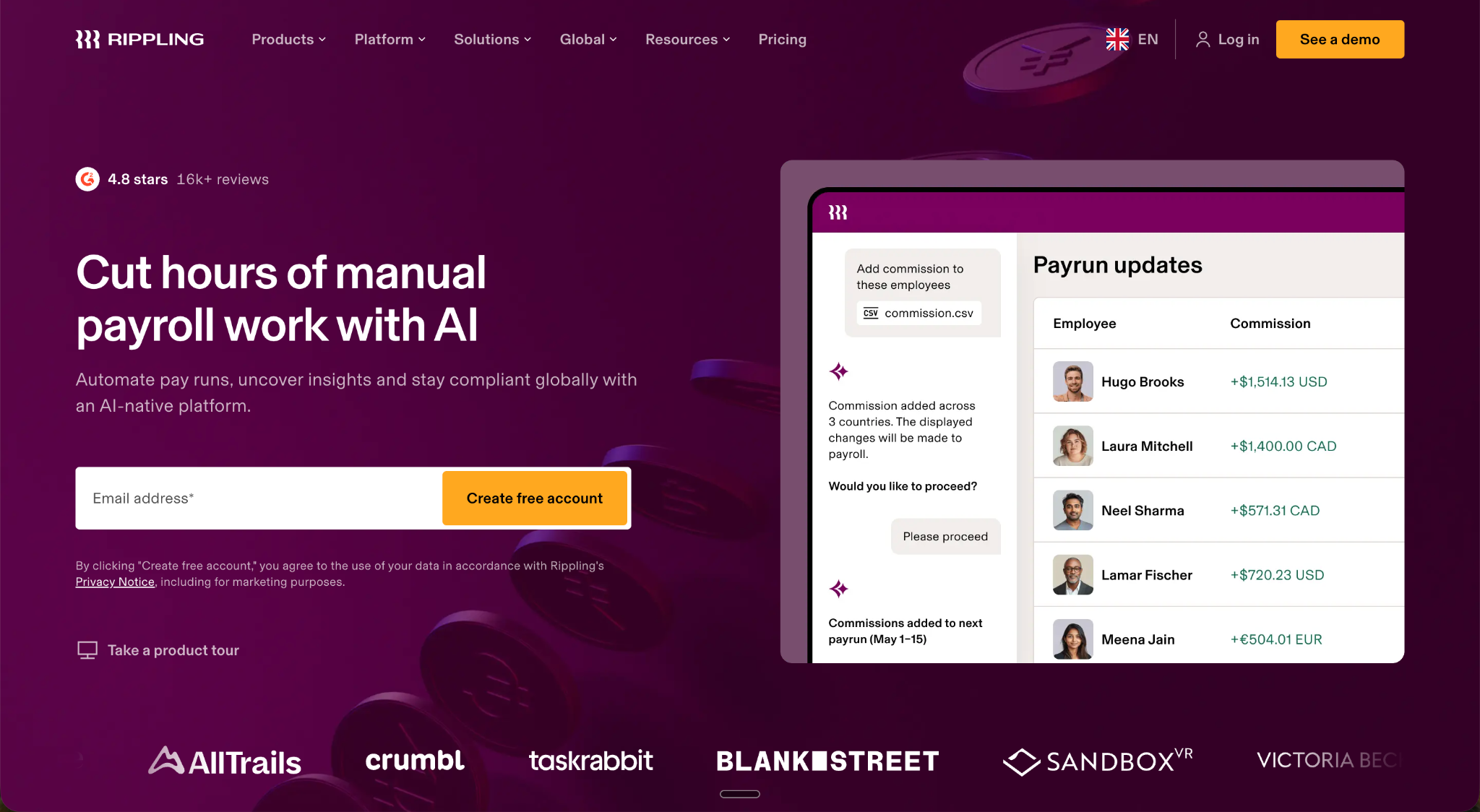
This page ranks according to Ahrefs for terms like:
- payroll online software
- global payroll
- global payroll solution
- rippling payroll (branded)
Why SEO matters for SaaS product pages
People don’t always want to speak with a salesperson to work out whether a product meets their needs. In a survey of 646 B2B buyers, Gartner found that 67% preferred buying without a sales rep’s involvement. Your product pages should explain what your software does and who it’s for, without making someone book a call for the basics.
These pages also give visitors somewhere to take the next step. At one B2B SaaS company we work with, 97 of the 98 companies that became sales-accepted leads converted on pages with commercial intent (think product, pricing, and solution pages). Across that group, 89% converted on a different page from the one they first visited (client CRM analysis, approximately seven months in 2026).
That doesn’t tell us how long they took to convert or which channel brought them in. It shows that the page that attracts a visitor and the page that generates the lead aren’t always the same, which is why your SEO work should cover both the content people discover you through and the product pages they visit to evaluate your software.
Buyers also ask AI assistants to compare tools for them. Clear product information that those systems can access gives them something useful to reference, though it doesn’t guarantee a mention.
Benefits of optimizing SaaS product pages for SEO
Here’s what you’re working toward:
- Reach people searching for the category or capability you sell, even if they haven’t heard of you
- Build an organic source of discovery that can continue after an article or page is published. That can reduce reliance on paid acquisition
- Give search engines and AI platforms accessible product information they can evaluate and potentially reference
- Connect commercial-page visibility with sign-ups, demos, and pipeline, while recognizing that several pages may contribute to the same purchase
Now, read about 10 tips to make your product pages rank in Google and LLMs and get visibility so your audience reads the story you want to share, instead of competitors.
1. Map a priority commercial keyword and related terms to each page
Choose a keyword that describes the product or feature on the page, such as “electronic signature software.” Then look for related searches that need the same information. You can target those on the same page instead of creating a separate page for every variation.
Before deciding on the final keyword, check it on Google. Look at the types of pages that rank. If they’re mostly product pages, your product page may be a suitable match. If they’re mostly guides or comparisons, writing an article might be a better match for the search intent. Don’t assume a phrase belongs on a product page just because it includes “software.”
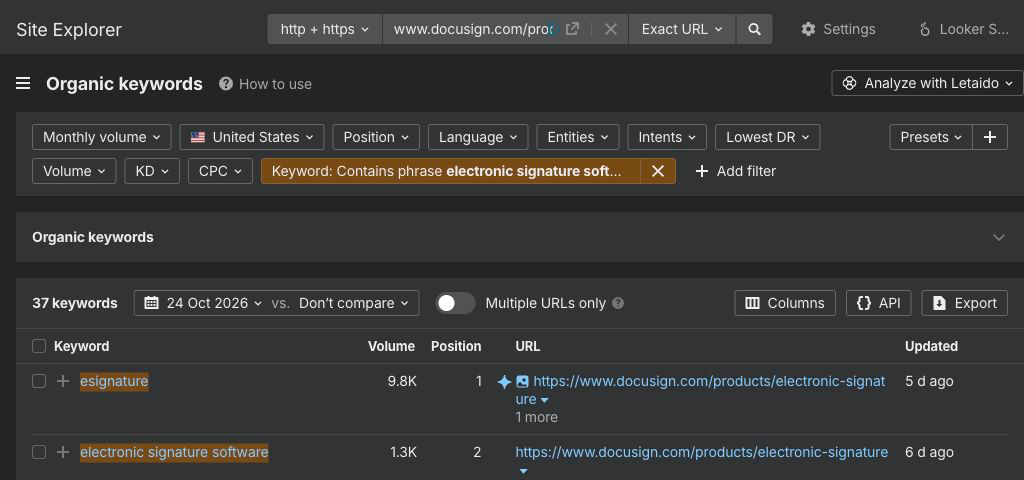
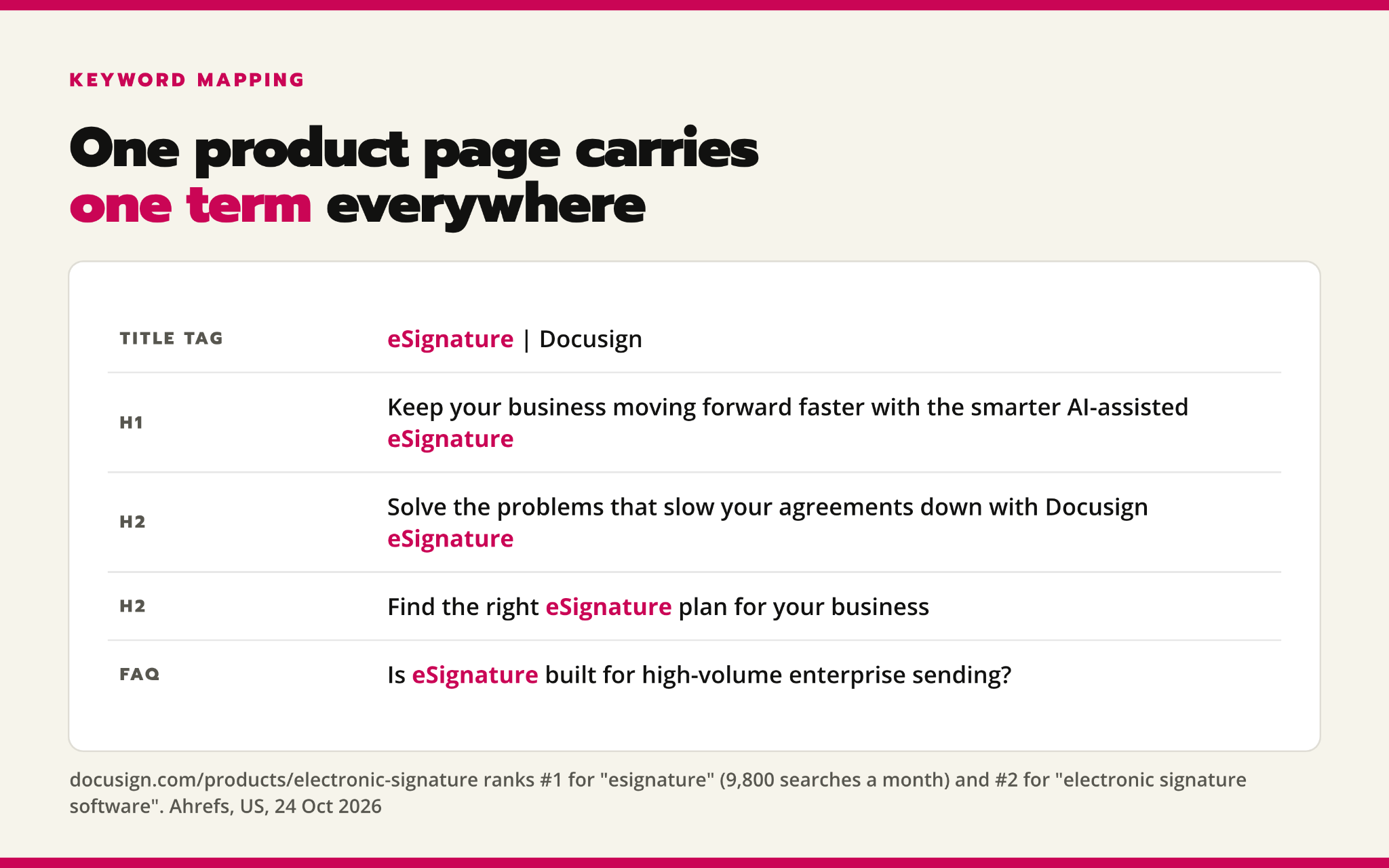
For example, DocuSign’s eSignature page illustrates how one product page can cover multiple related searches. According to Ahrefs, it ranked first for “esignature,” with an estimated monthly volume of 9,800, and second for “electronic signature software,” with an estimated volume of 1,300.
The word “eSignature” appears in the title of their page, main heading, several section headings, and FAQ questions. The topic is clear, but you don’t need to repeat the same phrase in every heading.
With this in mind, your next move is to choose which page should rank for each keyword, then check Search Console to see which page actually appears for them. If two pages show up for the same keyword, compare their content. Merge them only if they target the same intent; otherwise, make their different purposes clearer.
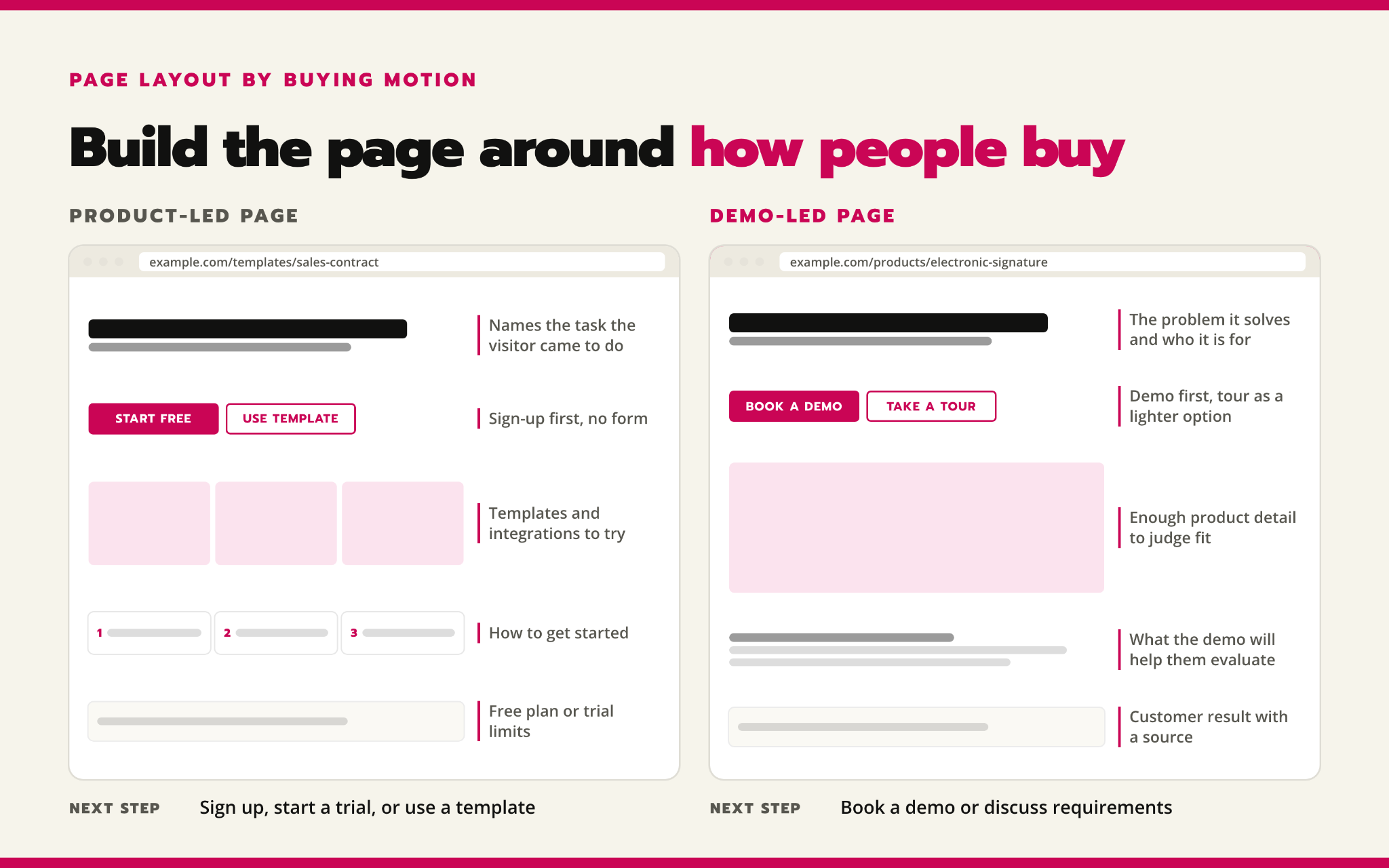
2. Build the page around how people buy your product
If people can sign up and use your software themselves, show them what they can do and how to get started. If they need a sales conversation first, explain the problem your product solves, who it’s for, and what they’ll get from booking a demo.
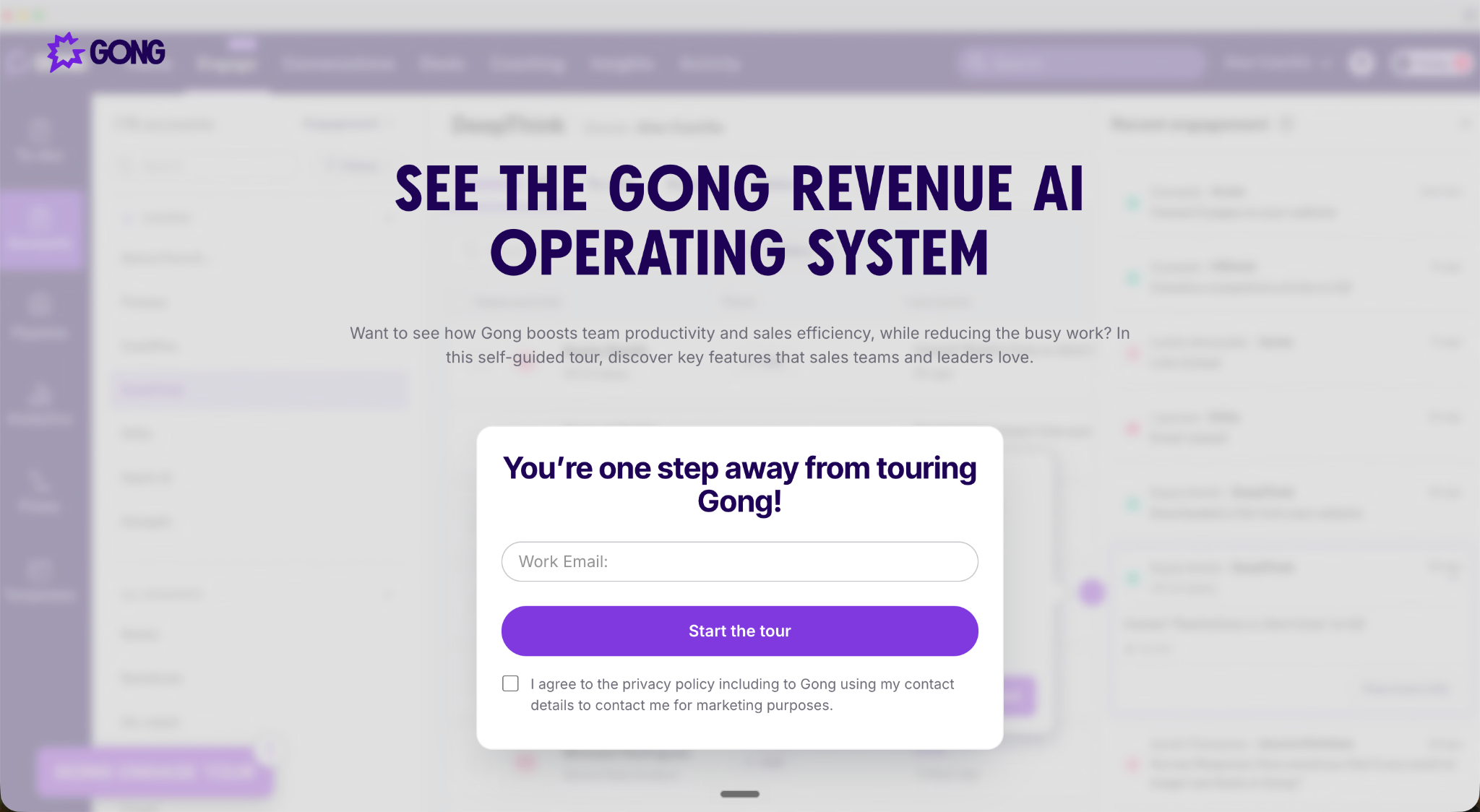
See how Zapier’s app directory and Notion’s template gallery give people narrow starting points. Compare those with Gong’s revenue intelligence page and Workday’s HCM page, which emphasize evaluation and demos.
Demo-led product pages don’t mean you should hide the product. Gong and Workday also offer tours or demo content, so the main decision for you is to choose what helps the buyer.
If people start free trials in a marketplace, check whether your optimized pages should point there. Ranking your own page higher won’t help if it makes the “sign up for a trial” page harder to find.
3. Give product pages a clear URL hierarchy
Use stable folders such as /products/, /solutions/, or /platform/, with clear navigation and links. Don’t move established URLs just to make them look tidier.
For CertifID, we did on-page SEO for solution pages by organizing them into appropriate subfolders and adding internal links from relevant blog posts.
We did this for their “recoveries” page, and according to Ahrefs, we rank No. 1 for “fraud recovery” and “fraud recovery specialist,” and second for “funds recovery services.”
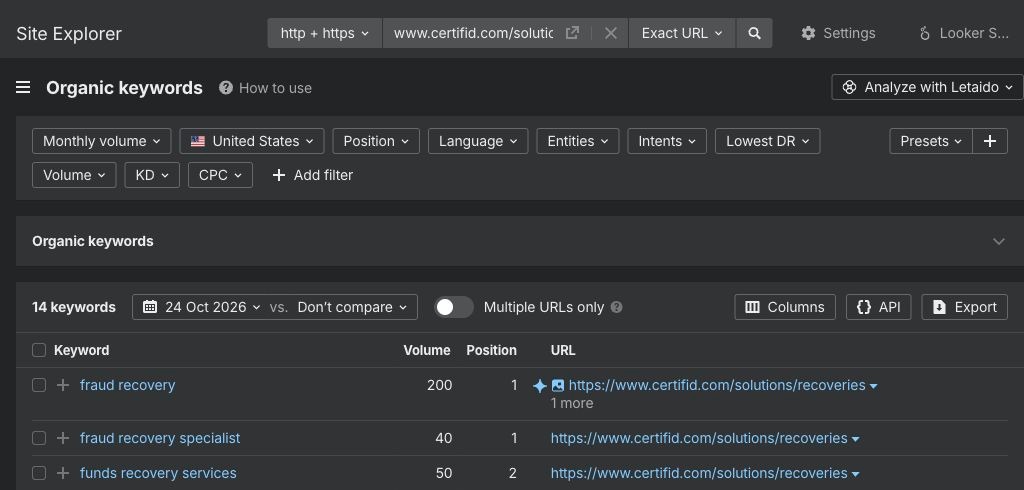
For CertifID, we also improved their on-page content, fixed technical issues, and added internal links to other pages. So we know that the rankings can’t be attributed ONLY to the URL change, but it definitely matters.
The takeaway here is that you should check the whole page group during a migration. We once found four child pages left behind after their parent solution page moved. Audit child URLs, redirects, links, canonicals, and the sitemap together to have a good view of URL hierarchies.
4. Explain the product clearly in the title, headings, and copy
People should be able to tell whether your product does what they’re searching for without decoding industry jargon. To do that, use the product category or capability you’re targeting in the title tag and main heading, then explain what it helps users do in the opening copy.
You should also use descriptive subheadings to explain how it works and an FAQ for questions the page hasn’t answered.
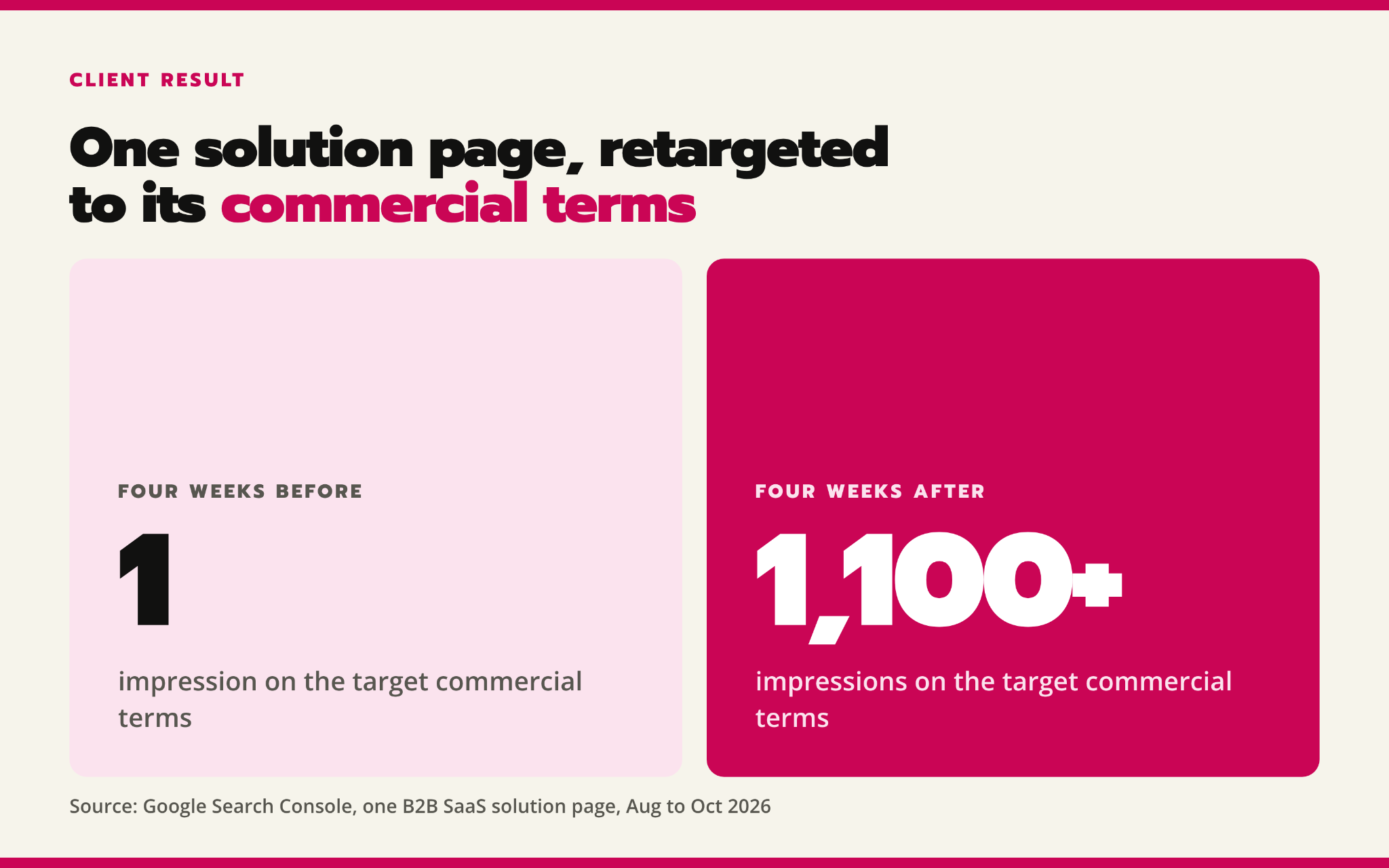
For one B2B SaaS client, we revised a solution page to focus on searches that better matched the product. We updated its title, headings, and FAQ, moved it to a more appropriate URL with a permanent redirect, and added links to related product pages.
As the chart below shows, impressions for the target searches increased from 1 to more than 1,100 in the four-week period afterward. After the copy, URL, and internal-link changes, the page appeared more often for those searches.
5. Make product details easy to find and read
Visitors need to find the information that helps them decide whether your product meets their needs. A tidy design won’t help if they have to open several tabs or watch a video to understand a key feature.
To do that, explain what the product does near the top, then organize the details into clearly labeled sections they can scan.
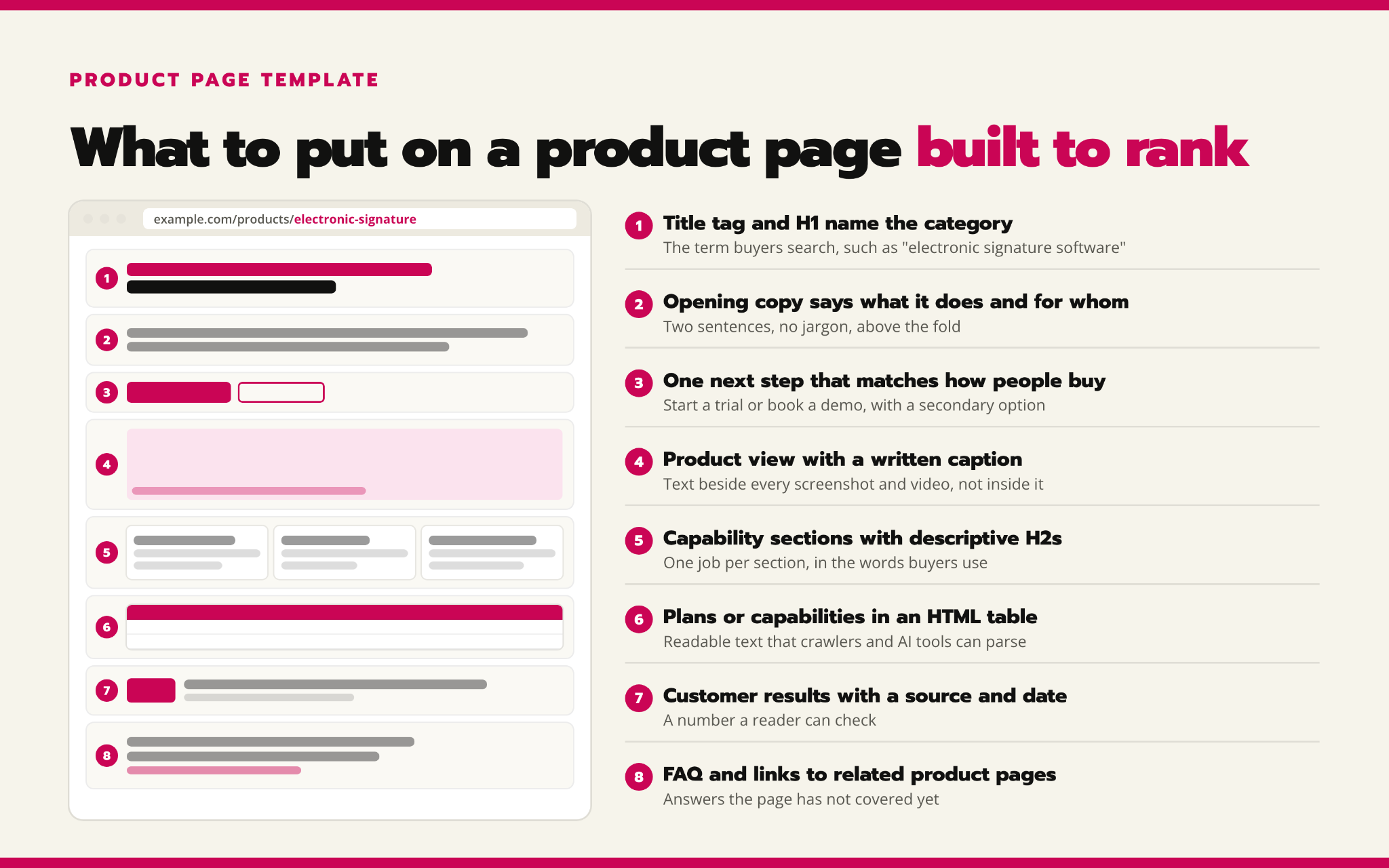
Keep features, prices, and requirements in readable text rather than embedding them in images. If you’re comparing plans or capabilities, use an HTML table so visitors can compare the details side by side. Add sources and dates to statistics and customer results so readers can check the claims.
Check the page on mobile too. Can someone find the same information without opening pop-ups or swiping through a carousel? Keep essential details on the page, and provide a written explanation or transcript alongside videos. People should be able to evaluate the product without working around the design.
6. Merge thin pages that answer the same search query (or target the same search intent)
If several feature pages repeat the same benefits and answer the same question, consider merging them into one useful page. Buyers get a fuller explanation in one place, and you can focus your updates and links on that page rather than maintaining several near-identical versions.
You should also compare what each page helps someone understand or do. Keep pages with a distinct purpose, such as explaining a specific integration, even if they get little traffic. A short page isn’t automatically a page you should merge.
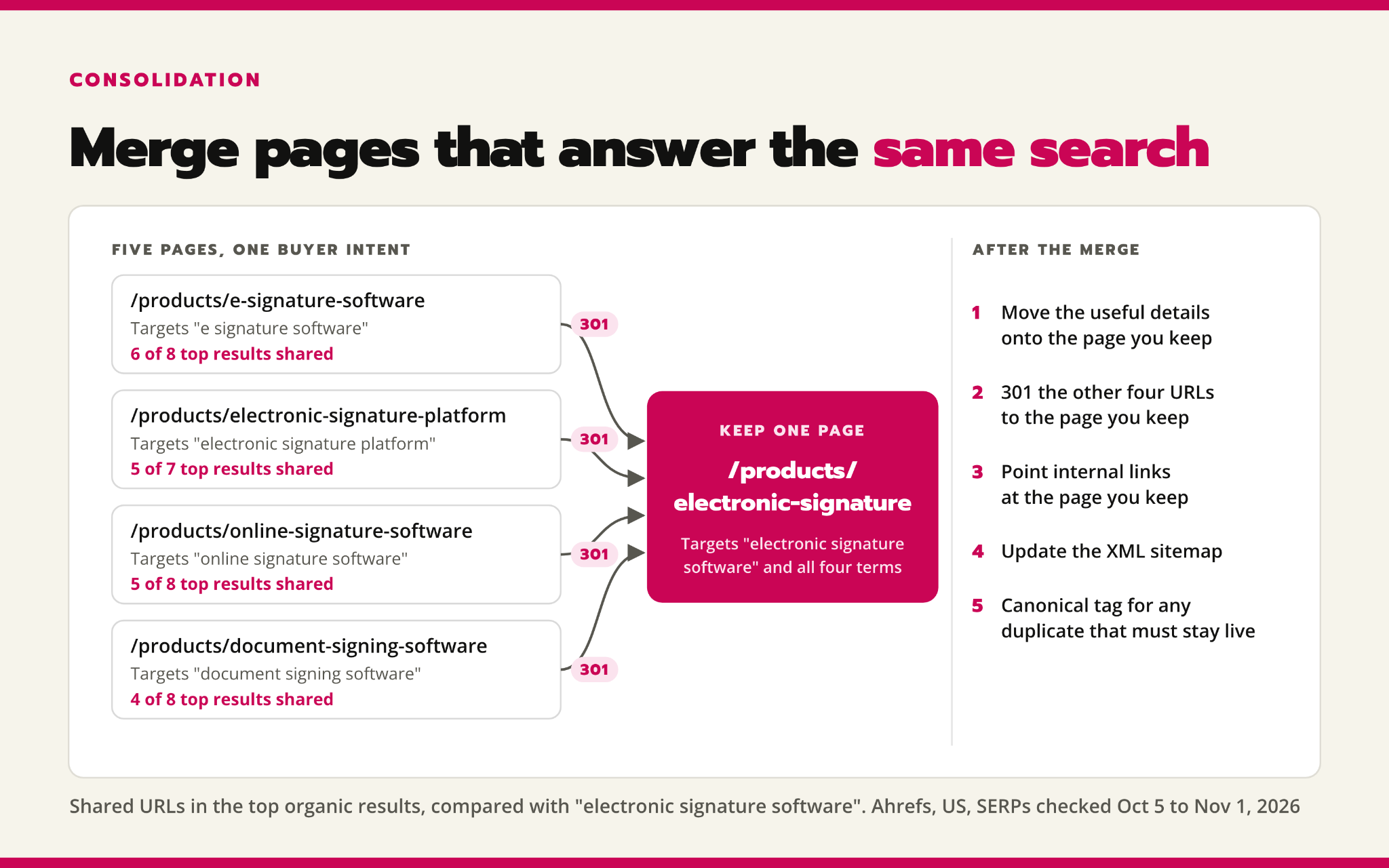
For pages that genuinely overlap, move the useful details onto the page you’re keeping and permanently redirect the retired URLs to it.
You should also update internal links and the sitemap to point to the retained page. If duplicate versions need to stay accessible, use a canonical tag to indicate which version you want Google to show instead. Google’s guidance explains both options.
This way, you can give buyers a more complete answer, not just reduce your page count.
7. Link related blog posts to the product page they support
Someone reading a comparison or an “xyz pricing” type of article may be deciding which product to buy. Linking to a relevant product page gives them somewhere to explore your software and take the next step, without having to find it themselves.
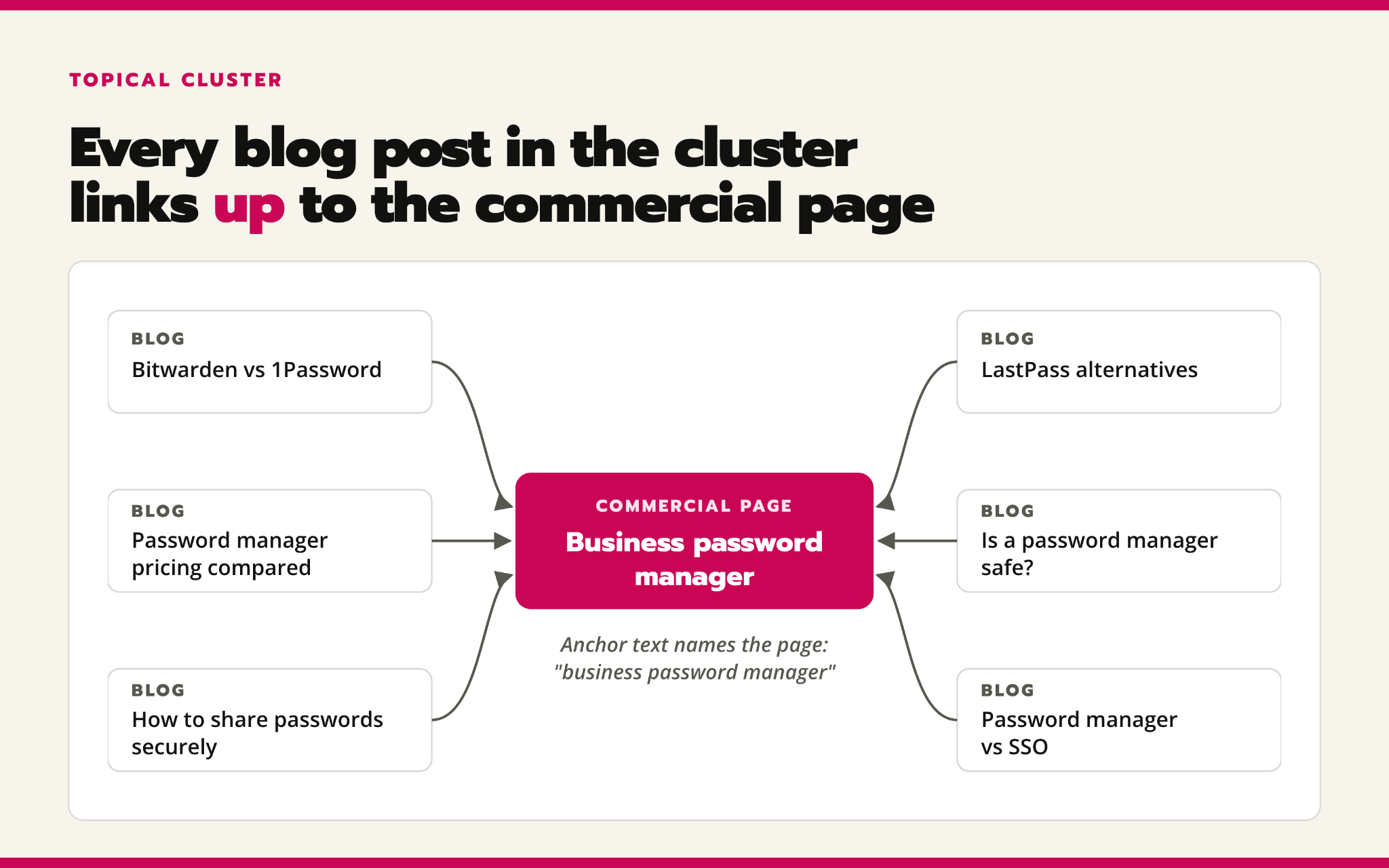
To make this easy, group articles around the questions buyers ask about a product or capability, then link each one to the relevant product page where the connection makes sense. Use the anchor text that describes the destination, such as “business password manager,” rather than “learn more.” You don’t need identical anchor texts in every article; it just has to make sense for the context of your reader.
This way, articles about pricing, security, alternatives, and product comparisons that answer different questions can lead readers to the same product page, as seen below, since that page is the logical next step:
In our experience, this can also increase free trial sign-ups.
For context, we worked with a client where we created six articles and linked to a specific product page. In monthly reporting, we identified that demo requests increased from two in June to 16 in July 2026. While this doesn’t prove that linking to the product page drove the increase in conversions, there is a positive correlation between passing SEO juice to a commercial page that strengthens the topical authority of this page and can contribute to improving positions for related commercial terms.
You can check blog pages that should have links to specific product pages. These should ideally be product pages with reasonable traffic, so that the effort of looking for internal linking opportunities is worth it.
8. Earn relevant backlinks to your important product pages
Your blog shouldn’t be the only part of your site that earns links. A relevant comparison, integration directory, or industry article can send people directly to product pages when they’re evaluating software. Prioritize pages that explain an important capability and help turn visitors into qualified leads.
To do this, look for places where your product genuinely belongs. Your integration partner can link to a page explaining how the connection works, while someone reviewing your product can link to the feature they’re discussing.
You should also check third-party resources where your product has been covered and give them accurate information and the current URL (if they have inaccurate product context). This can help get more qualified traffic to your page and improve your overall SEO efforts.
9. Fix technical problems that keep product pages from being found or used
Better copy won’t solve an indexing problem, and visitors still need a page that loads and responds properly. Before adding more content, check whether Google can access your product pages and whether people can use them without delays.
Work with your SEO and development teams to:
- Inspect important URLs in Search Console to see whether they’re indexed and which version Google has selected to show
- Check for accidental noindex tags, blocked resources, and duplicate URLs that could interfere with indexing
- Make sure navigation links lead directly to the right pages and can be followed by search engines
- Include the preferred, indexable URLs in your XML sitemap
- Update links that send visitors through several redirects instead of directly to the final page
Then check real-user performance data. Core Web Vitals measure loading speed, responsiveness, and unexpected on-page content shifts. Google’s recommended thresholds are LCP of 2.5 seconds or less, INP of 200 milliseconds or less, and CLS of 0.1 or less, measured at the 75th percentile separately for mobile and desktop.
You can also use performance diagnostics to identify what needs fixing, such as oversized images or slow scripts. If several product pages use the same template, fixing that template can address the problem across them. Retest afterward to make sure the pages work better without losing useful product information.
10. Make product information accessible to AI systems
An AI search tool may not be able to read everything a visitor sees on your product page. If key features or pricing only appear after JavaScript runs, some AI tools may miss them.
To avoid this, ask your developers to check whether that information is included in the HTML the server sends, not just the finished page in a browser.
On one B2B SaaS site we reviewed, turning off JavaScript made headings, links, calls to action, and pricing disappear from the product-page templates while the blog pages still showed their content. That helped us identify which templates depended on JavaScript to display essential information.
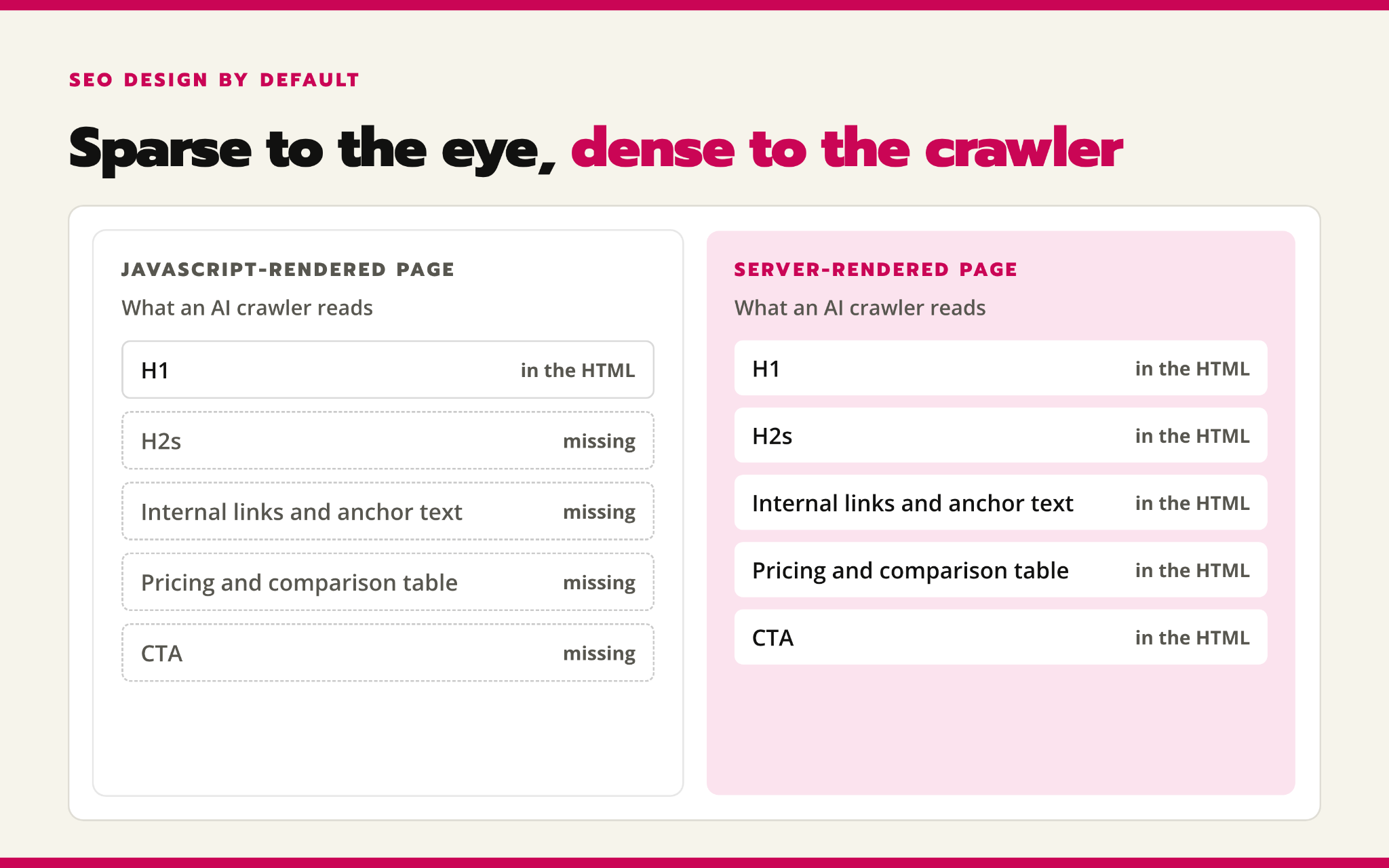
Where important details are missing, your developers can use server-side rendering or prerendering to include them in the HTML. Google can render JavaScript, but other systems have different capabilities. Turning JavaScript off is a useful diagnostic check, not an exact simulation of every AI crawler.
You should also ask your developers to check that your site isn’t accidentally blocking AI tools from checking your pages. For ChatGPT, you can allow its search crawler to access your pages while still blocking its separate training crawler.
The goal is to make accurate product information available for these systems to use.
How we help your product pages bring in qualified leads
At Kairos Labs, we help you work out which product pages need attention and what’s holding them back. That could mean targeting keywords that better match your product, explaining its capabilities more clearly, fixing technical problems, or adding relevant internal and external links.
We use search performance and lead data to help prioritize the work. Then we track what changes: whether the pages appear for relevant searches, attract clicks, and generate demo requests or trial sign-ups. That helps us distinguish better rankings from results that matter to your business.
If your blog attracts visitors but your product pages aren’t generating enough interest, book a strategy call. We’ll help you identify where to focus.
Let's design a solid SEO/AEO strategy and execute it so you get ahead of your competitors.
Book a call