

Key takeaways
- SEO can still bring in business, but rankings and traffic alone won’t tell you whether it pays. Instead, measure the success of an SEO program by the number of qualified leads that found you via AI Search
- An AI Overview can answer a buyer’s question without sending them to your site. What matters for your brand is to appear for the right queries so your ICP sees your product at the top which increases chances of you getting shortlisted when your ICP is on the market
- Technical buyers need enough detail to decide whether your product is what they need. Prioritize pages that explain what it does and what it would cost them to use it
- Judge revenue against your actual sales cycle. Use earlier changes in relevant searches and qualified leads to decide what to fix while those deals develop
Yes, SEO still works for B2B companies. Whether it deserves more of your budget is a separate question. The same checks apply to in-house or agency SEO.
A team might find your product through Google, then spend months evaluating it before buying. Meanwhile, fewer people may click through to your blog because Google’s AI Overviews answer their questions.
To decide how much to spend on SEO, you need to know whether it brings in people who become customers, not just whether your traffic rises or falls. Here’s how to check.
What has changed about SEO?
Google’s AI Overviews can answer a question directly in the search results. If that gives someone what they need, they may not visit your page, even if it ranks well. See example below:
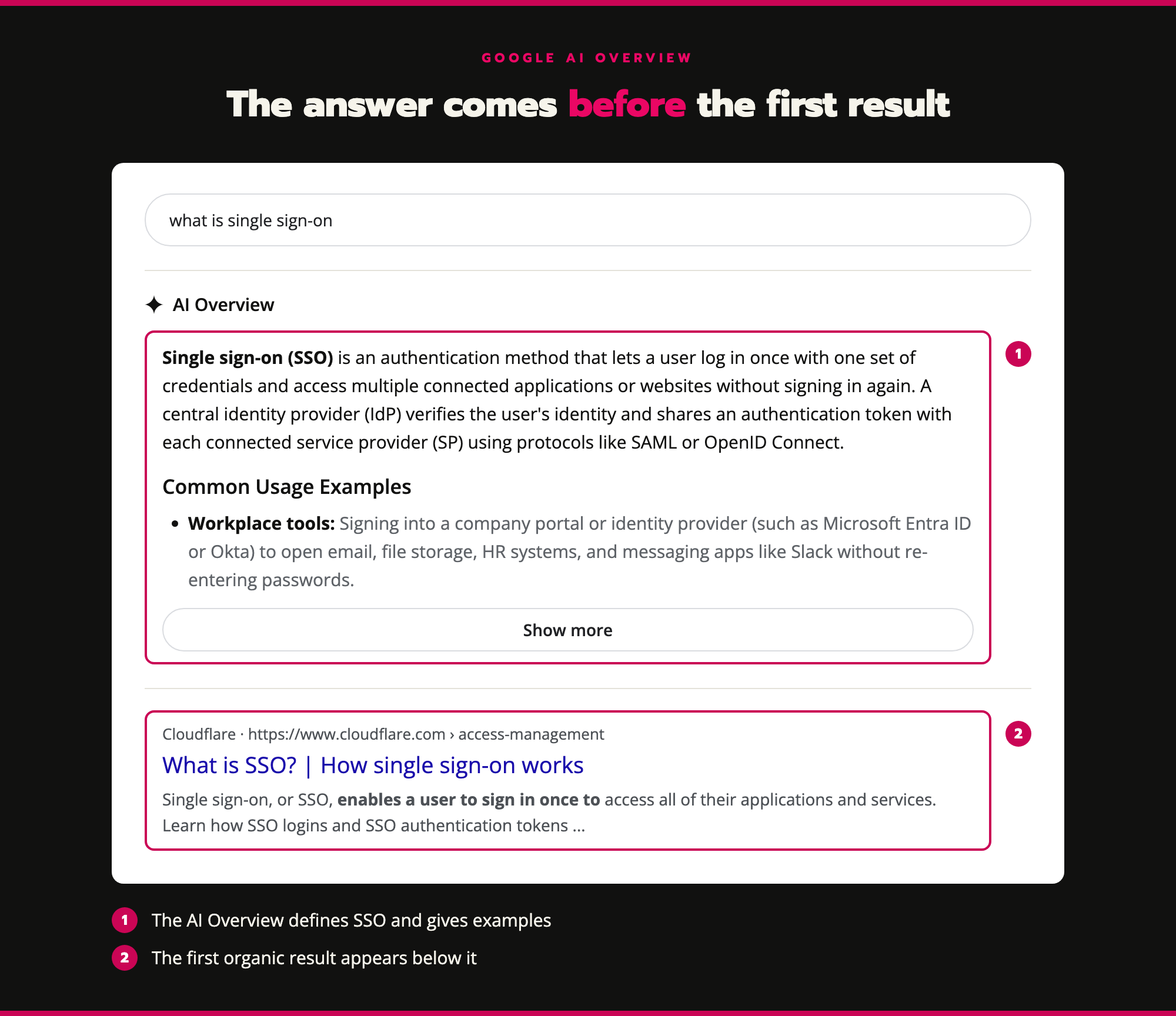
In Pew Research Center’s analysis of 900 US adults, people clicked a traditional search result on 8% of visits with an AI summary, compared with 15% without one. Different searches received different results, so this wasn’t a controlled experiment, but it shows why a team can’t assume every search appearance leads to a visit.
Commercial searches aren’t exempt either. A Semrush study of more than 600,000 keywords found that the share of commercial queries displaying AI Overviews grew 71% from its starting level between November 2025 and April 2026.

This means that people comparing products are increasingly seeing AI-generated answers in Google, so your comparison pages may also lose clicks if those answers give buyers enough information.
For example, for the query What is the best personal password manager I can easily use on my phone in 2026? How would I typically use it? Does it detect my apps automatically?” Google gave a complete answer:
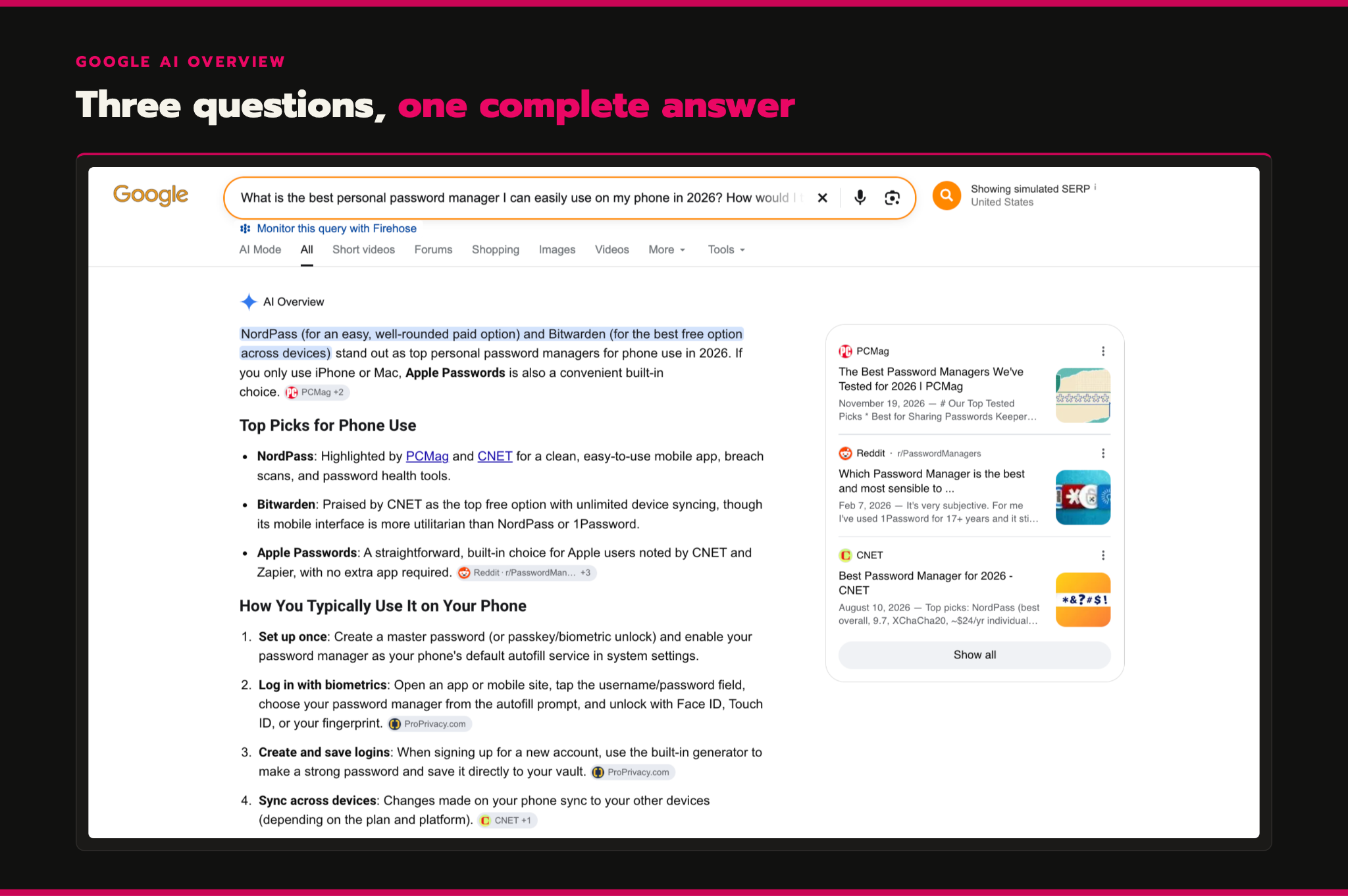
Now, this doesn’t mean that informational articles are no longer useful. Someone may need an example or a fuller explanation than what an AI summary provides, so you can still update those informational articles you create to maintain freshness and keep it citable.
One tip: check what Google already says about the query so your answer matches (or improves on) what it finds, giving people a reason to visit your page. Doing this well also helps you rank in AI Overviews when Google generates an answer.
You should also search for the questions your buyers ask regularly, then check the pages you rank for in Search Console. If impressions have fallen, investigate why. If impressions are steady but clicks have dropped, look at what else appears in the results, including AI answers.
You should also compare visits and demo requests in your analytics. If visits are steady but requests have fallen, investigate whether the page gives people enough information to inquire.
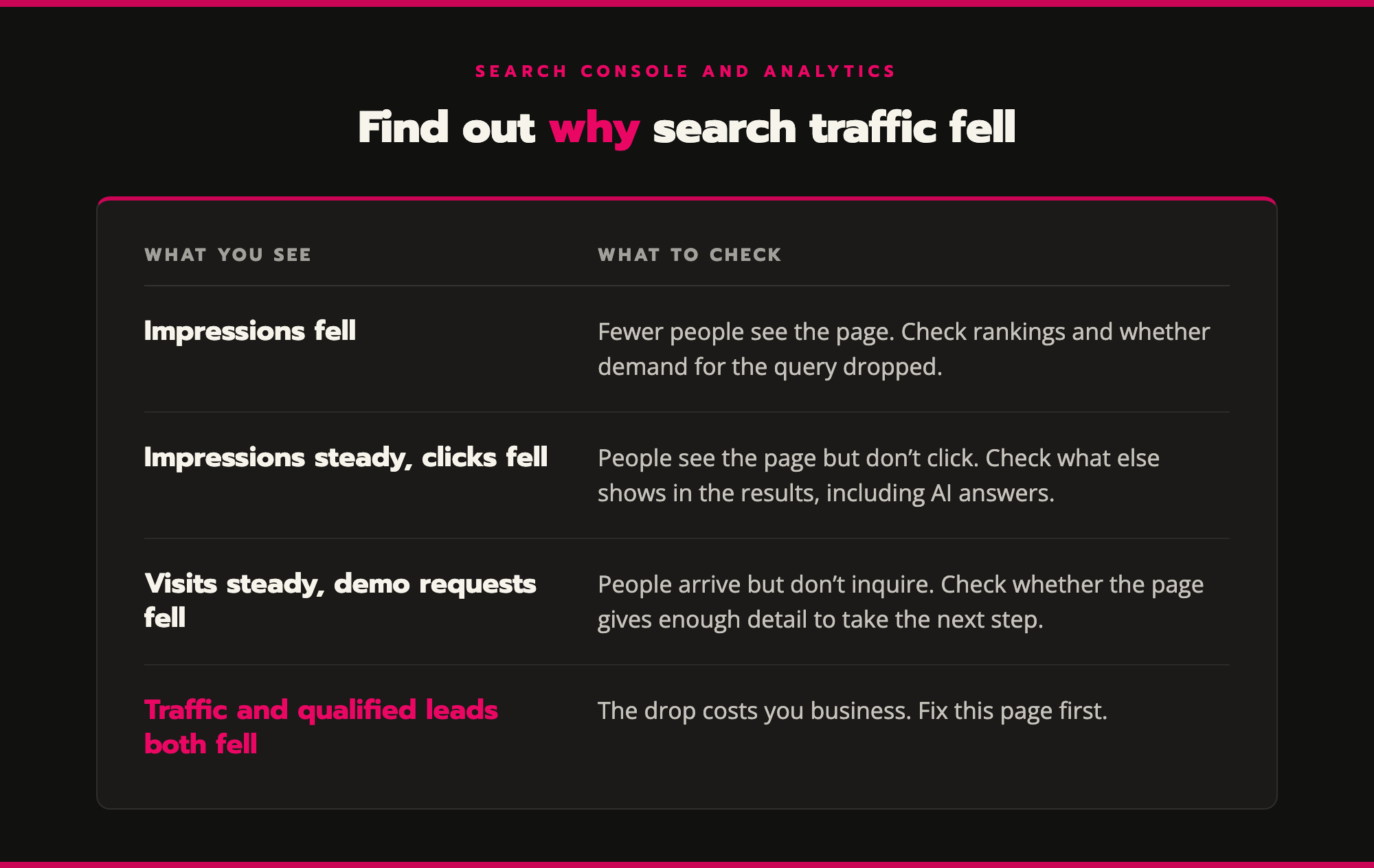
All this can help you avoid the assumption that AI Overviews are “eating” your clicks and potential revenue, which leads to the next question…
Can SEO still bring in qualified leads?
Yes, when your content reaches people looking for a product like yours and helps them decide if it’s a good fit.
For CertifID, a wire fraud prevention company, we used product demos and expert interviews to understand what buyers needed to know. We then helped produce more than 40 blog posts over 12 months and improved their solution pages.
The result? They saw 31% year-over-year growth in qualified leads, which also led to more closed deals. They also saw a 247.8% increase in non-branded organic clicks YoY, capturing audience beyond brand searches, and we saw a 308% increase in LLM traffic YoY (762 sessions with 53-68% engagement rates). We count that LLM visibility as part of whether SEO is still working, not as a separate channel.

Our work also included technical fixes, so the improvements weren’t down to content alone. But this shows that useful content gives buyers a reason to read your pages, and that’s what you should always consider when you check whether SEO still works.
Why technical buyers and industries with longer sales cycles need a different approach
Before booking a demo, someone evaluating technical software may want to know whether it works with their existing systems and how much effort it will take to set up. Your pages should answer those questions so they can decide whether they want to speak with your team.
For scenarios like this, “Streamline your workflow” doesn’t give either person enough information to evaluate the product. Instead, give them pages they can understand and share:
- Product and use-case pages that explain what the tool does and who it’s for.
- Documentation that explains setup steps and technical requirements.
- Comparison pages that show differences in capabilities, rather than simply listing features both products offer.
- Pricing pages that explain what affects the bill so buyers can estimate their costs.

Use the questions buyers search for to decide which pages to create or improve. That makes your SEO work easier since your pages are optimized to help people find the information they need to evaluate your product. Start with SaaS product page SEO, since those pages are often where technical buyers decide whether to inquire.
How to tell whether SEO is working for your company
Before changing your SEO budget, check whether search visits become qualified leads and customers. These four checks will help you track that progress:
1. Check which pages lost traffic and whether it affected leads
A drop in traffic doesn’t tell you how much business you’ve lost. If a product page loses visitors and demo requests fall too, it deserves a closer look.
In Search Console, separate searches containing your brand or product name from those that don’t. Someone searching your brand may already know you from a recommendation. Searches without it show which broader questions bring people to your site, though those visitors may know you too.

You should also review product pages separately from blog posts. A drop in visits to a blog post that rarely brings in potential customers may matter less than fewer clicks to a product page that regularly generates qualified demo requests.
Then use your analytics and CRM to check whether those pages are also generating fewer inquiries. Prioritize pages where the traffic drop coincides with fewer qualified leads. A content audit shows which of those pages are worth updating first.
2. Check whether leads from search become customers
More form submissions don’t necessarily mean SEO is bringing in more business. You need to know whether those people are suitable buyers and whether they eventually buy.
When someone submits a form, save how they found your site and the first page they visited in their CRM record. Keep those details as your sales team works with the lead, so you can connect a later sale to the original visit.
Then check how many leads from search meet your sales team’s qualification criteria. Follow those leads through to closed deals. If plenty inquire but few qualify, review whether your pages attract the right audience. If suitable buyers drop out later, ask sales what stopped them from buying.
This helps you decide if you need to change your SEO tactic. For example, if search brings in people who don’t need your product, you might need to reconsider the keywords and topics you target. But if it brings in qualified buyers who don’t purchase, you’ll also need to figure out what’s stopping them before spending more on SEO.
3. Ask customers how they heard about you
Add a “How did you hear about us?” question to your demo form and let people answer in their own words.
A buyer might write “a colleague recommended you,” while analytics records a Google visit. Both can be true. The colleague introduced your company, and Google helped the buyer find your website.

Save both details in your CRM. When reviewing leads from search, check those answers too. They can help you avoid giving SEO all the credit for demand that started elsewhere.
It also helps you know where to channel extra efforts when you have more budget for marketing initiatives outside traditional SEO.
4. Give leads enough time to progress
Don’t judge last month’s leads against customers who have had a year to decide. Group leads by the month they entered your CRM, then compare their progress after the same amount of time. For context, compare January’s leads after three months with February’s leads after three months.

If customers usually take nine months to buy, a lack of sales after one month doesn’t tell you much. Check whether those leads are suitable buyers and whether they’re moving forward, and how. Have they completed a demo or started a product trial? Are they reading more relevant pages that show that they’re interested?
Agree on review dates before you start a “new” SEO initiative. Check whether the pages appear for relevant searches early on, and as you start getting new leads, check whether they’re suitable buyers moving toward a purchase.
Once they’ve had enough time to buy, check how many became customers and how much revenue those sales generated.
When to invest more in SEO and when to change course
If SEO is bringing in clicks and customers, look for other buying queries your content hasn't been optimized for yet. Use those gaps to decide which pages to work on next.
If people visit but don’t inquire, find out what’s stopping them before publishing more articles. And if the inquiries come from people your product can’t help, rethink the queries you’re targeting so you stop optimizing for people who aren’t in your ICP.
How Kairos Labs SEO agency can help
If you’re unsure whether to keep investing in SEO, a SaaS SEO agency can help you work out where it’s bringing in potential customers and what needs to change. Our SEO and content services for B2B SaaS cover the research, content, and measurement work this kind of review requires.
Our four-week Pipeline Strategy Sprint helps you choose which content and SEO initiative to prioritize. We also identify buyer queries to track in AI assistants and plan how you’ll measure results beyond traffic.
Book a strategy call to discuss what’s working for your team and where you need help.
Let's design a solid SEO/AEO strategy and execute it so you get ahead of your competitors.
Book a call