

Key takeaways
- Use buyer keywords to record where AI Overviews mention your brand, recommend it, or link to your website
- Check indexing and snippet restrictions before rewriting pages Google may be unable to use
- Compare cited sources with your pages to find buyer questions you haven’t fully answered
- Correct outdated product details on relevant review sites as well as your own pages
- Track AI visibility separately from search traffic, qualified inquiries, and sales
If your competitors appear in AI Overviews and your company doesn’t, it can be hard to know what to change. Google needs to be able to index your pages and use your content in AI answers, which is usually the right place to start. The sources cited in AI Overviews can also help you spot buyer questions your content hasn’t fully answered, so you can improve your content to include them.
In this article, we’ll share five steps to help your SaaS team improve its AI Overview visibility. You’ll use those findings to check technical restrictions, improve product information, and measure progress.
What does it mean to rank in AI Overviews?
People often use “ranking in AI Overviews” to mean that Google links to their page as a source in its AI-generated answer. Google can also name or recommend your company without linking to your site. These are different outcomes from a page’s position in the typical organic search results.
For example, our agency is ranking in AI Overview for “best cybersecurity content agencies”

The AIO is pretty objective and doesn’t explicitly recommend any company but rather describes where each agency specializes in.
Whether AIO will or won’t recommend a brand or tool also depends on the query.
For “best project management software” angle, recommendations are more likely as it implies the angle.
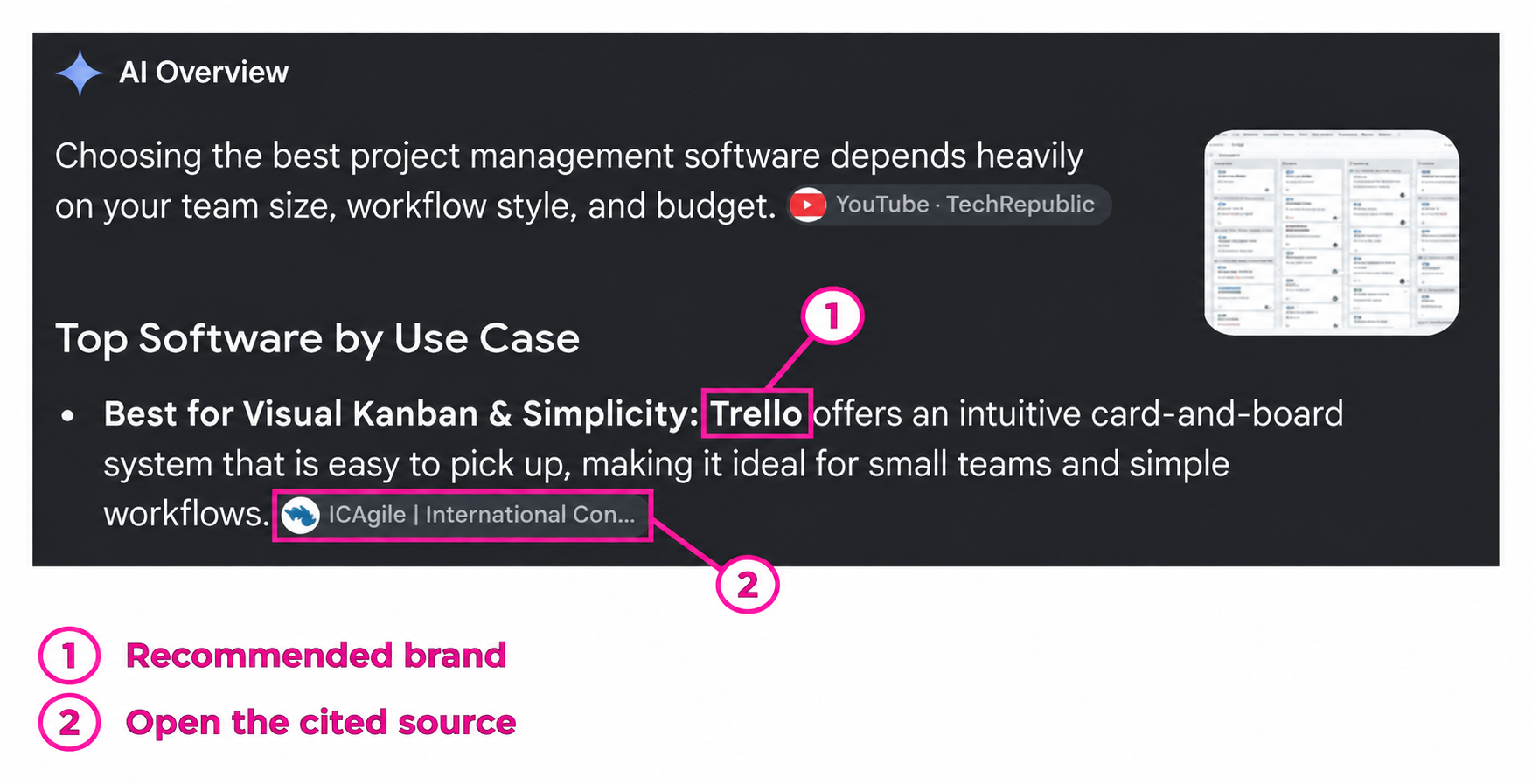
For each keyword you can track:
- Does it mention your brand? Copy the sentence about your company. Note if Google recommends your product for a particular need or simply names it.
- Does it describe your product accurately? Check claims about features, pricing, integrations, and suitable customers against your current product information.
- Does it link to your website? Save the exact URL. Google can mention your brand without linking to you, or cite your page without recommending your product.
- Which competitors and sources appear? Save competitor names and cited URLs, including review sites, comparison articles, and other third-party pages.
| What you see | What it tells you |
|---|---|
| Your brand is mentioned | The answer names your company. Read the surrounding sentence to distinguish a recommendation from a general mention. |
| Your page is cited | Google links to your page as a source. This doesn’t necessarily mean the answer recommends your company. |
| A third-party page is cited | Google links to another publisher’s page, which may discuss you or a competitor. Open it to check what it says. |
Google says AI Overviews may run related searches across subtopics, a process called query fan-out. A cited page may therefore answer one part of the question rather than target the exact keyword you typed.
This also means that ranking in the top ten of organic search doesn’t mean you’ll be automatically cited or recommended in AI Overviews (or AIOs). Ahrefs’ March 2026 study of 863,000 keywords found that about 38% of cited URLs ranked in the top ten organic results for the same keyword. That shows overlap, not why Google chose those sources.

With that in mind, here’s what we know about ranking in AI Overviews (to increase mentions and citations).
1. Get a baseline of your AI Overviews visibility
The first step to improving your visibility in AIO is to know the current baseline.
You need to know where your brand already appears in AIO, where competitors appear instead, and what Google tells buyers about your product.
To do this, choose keywords that cover your main products, the pain points they solve, and the questions buyers ask when they’re looking for software like yours. You can also mine your sales calls, community threads and support tickets looking for terms that have search volumes.
Once you have a list of keywords, you can build a content calendar, and choose a publishing cadence.
For example, if you’re planning to publish 20 content pieces per month (blogs, landing pages, templates, etc.) targeting specific keywords for six months, you should track 120 core keywords.
Once you upload these 120 keywords to a rank tracker in Ahrefs or any other tools, you’ll be able to form a baseline.
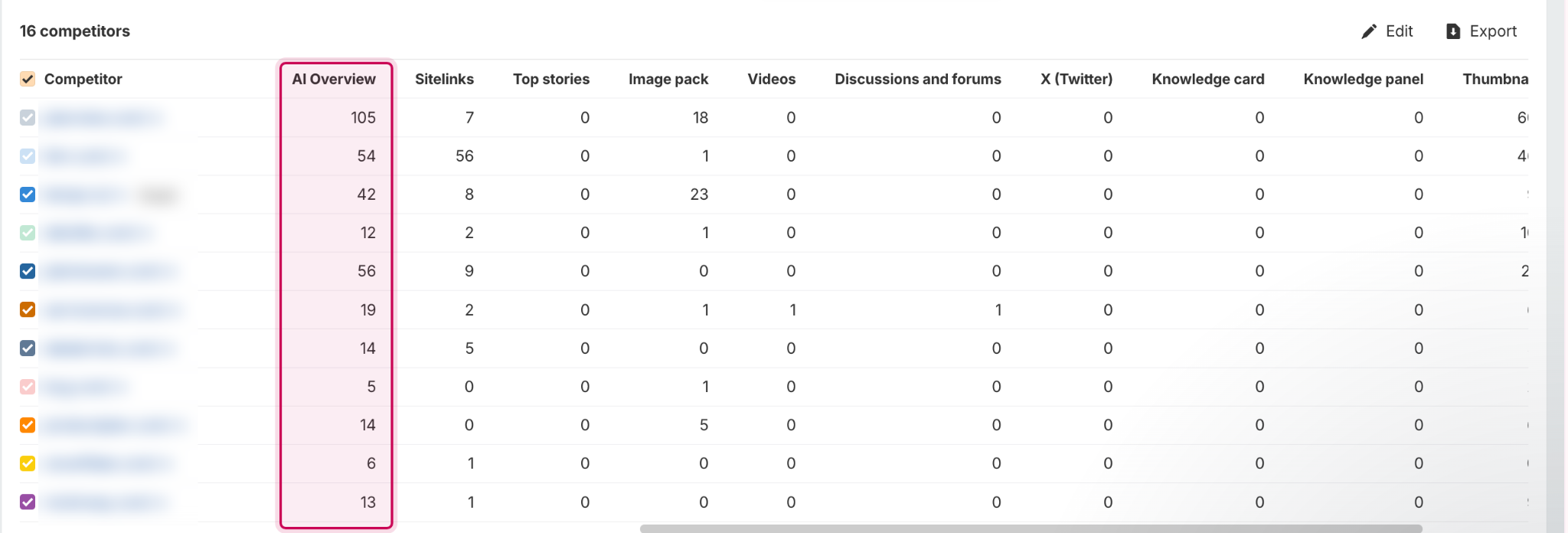
For example, here we’ve formed a baseline for 700 keywords for one of our customers. We can see that currently, they’re present in 42 AI Overviews. This gives us a good insight into the starting point.
Once we produce content together, targeting keywords that don’t rank in AIO, we can check whether our content reaches top 10 in Google and which AI Overviews our customer gets into.
You can also automate the baseline formation and measurement.
If you have a long keyword list, your team can build a small tool that collects AI Overview answers and source links or use APIs like DataForSEO or SerpApi, then export the results to CSV for analysis.
You can also use a browser agent you already have access to. For example, Claude in Chrome or a ChatGPT extension can navigate websites for you. This gives you a way to try the workflow before building a tool or paying for a separate monitoring service for AIO.
Give the agent a small batch of keywords and ask it to record what actually appears in Google. You can start with this prompt or refine as you see fit:
“Check our brand’s visibility in Google AI Overviews.
- Brand and product names: (names)
- Website: (URL)
- Keywords: (list)
Search each keyword exactly as written in ordinary Google Search. Inspect the AI Overview, not AI Mode. Export one CSV row per keyword checked, recording:
- Date, keyword, and search-results URL.
- Status: AI Overview captured, no AI Overview shown, or check incomplete.
- Full visible AI Overview text.
- Our brand’s presence: absent, mentioned, or recommended. Include the exact wording supporting your classification.
- Other brands named and what Google says about each.
Copy all accessible AI Overview source titles and URLs. Expand answers and source lists where possible and flag anything you cannot fully capture. Treat blocked or failed checks as incomplete, not as absent AI Overviews.
Record the observed location and signed-in status in a note, and use only observed evidence. Don’t invent missing details or include ordinary search results as AI Overview citations.
Compile all findings into a CSV and Markdown file and summarize where competitors appear without us and which claims about our product need checking. Identify the keyword behind each finding.”
Once you’ve collected the results, upload the CSV to Claude or any other AI tool and ask it to group findings by product, buyer need, and competitor. For example, it could identify that Google repeatedly recommends competitors for Salesforce integrations while leaving your product out. Open the cited pages and compare how they explain the integration with your own page. Note any useful details your page is missing.
Check those findings against the saved answers and your current product information. That gives you specific questions to investigate in the next steps: can Google index the relevant page, does the page explain the integration clearly, and what do the cited sources say that yours doesn’t?
Keep this export as your baseline. Run the same keywords again after making changes so you can compare how often your brand appears and how Google describes it.
2. Check indexing and Google’s AI-search settings
If your checks found that Google rarely cites your website, check for technical restrictions before rewriting your content.
Choose the pages on your website that answer the buyer questions you tested in step 1. For example, if you checked “(your brand) Salesforce integration,” inspect the page explaining that integration.
Google’s AI-search guidance says a page must be indexed, eligible to appear with a text snippet, and included in Search generative AI. These requirements let Google consider your content; they don’t guarantee a citation or brand mention.
You can check indexing in Search Console yourself and ask your in-house or agency SEO specialist or developer to help resolve technical problems:
- Check that the page is indexed. Enter its full URL in Search Console’s top inspection bar. If you see “URL is not on Google,” open “Page indexing” to read the reason. You can then ask your specialist to investigate accidental indexing blocks or a duplicate page Google selected instead.
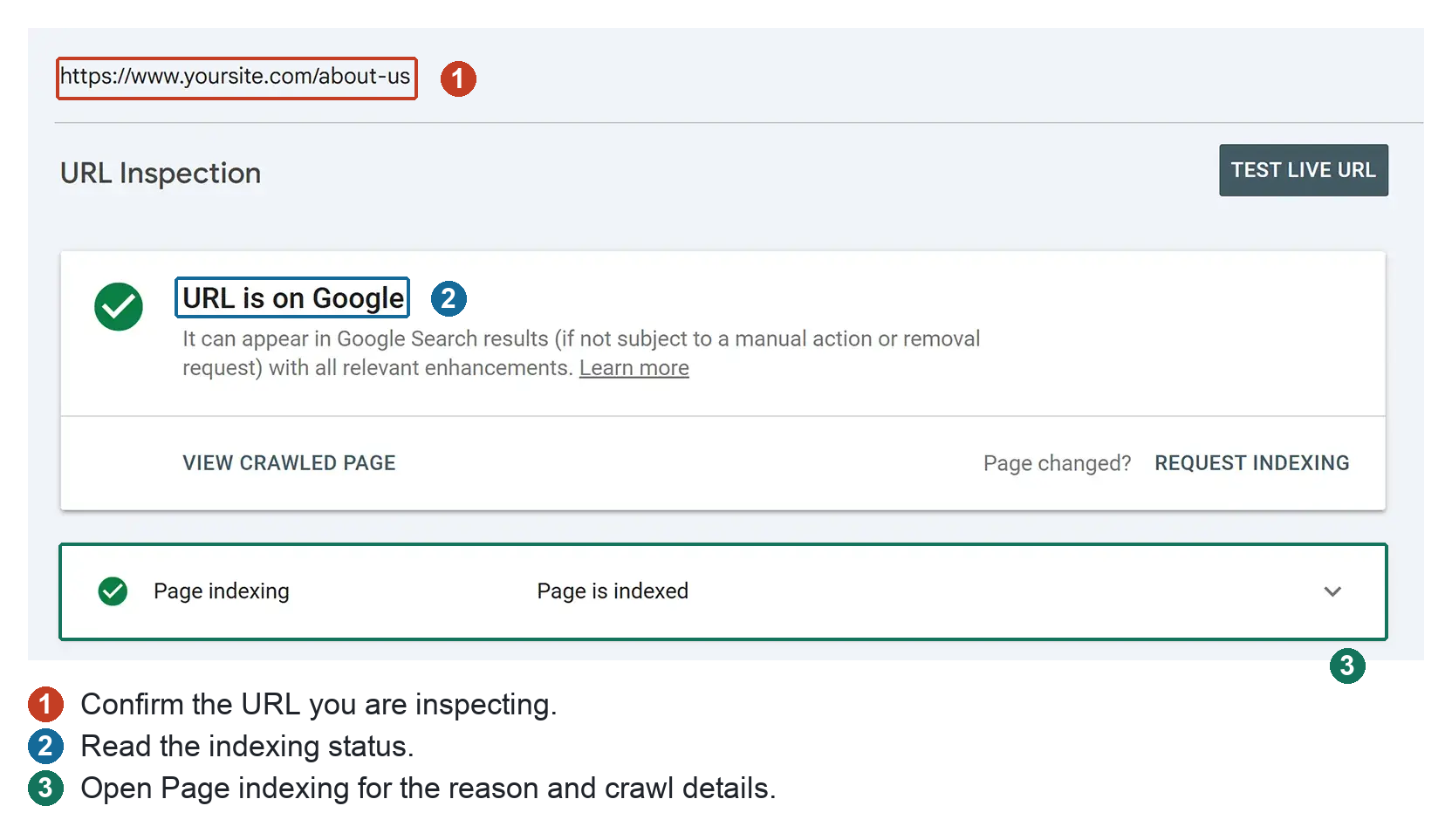
- Source: Semrush’s Search Console guide.
- Check that Google can access the page. If the inspection reports a crawl problem, ask your developer to check for accidental blocks in robots.txt, hosting settings, or security rules. Remove unintended blocks and test again. If you’re redesigning the site, agree these settings with your agency first; see our guide to SEO-friendly website design.
- Check restrictions on page text. Ask your developer to review the page’s snippet controls. For example, nosnippet and max-snippet:0 prevent text snippets, while data-nosnippet excludes specific sections. Remove accidental restrictions on information you want Google to use, keeping deliberate exclusions.
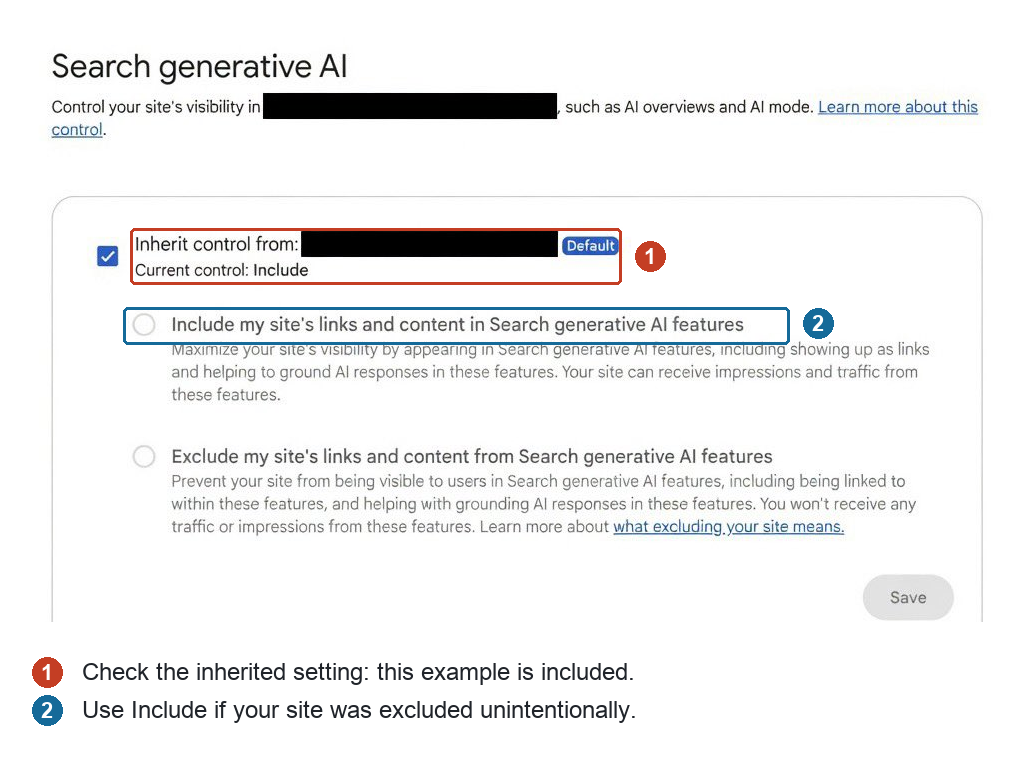
- Check inclusion in Search AI features. Open Settings → Search generative AI in Search Console. If your site is excluded unintentionally, ask the site owner to enable inclusion.
- Source: Search Engine Roundtable.
3. Compare repeated answers and the pages they cite
Use the results from step 1 to identify keywords where competitors repeatedly appear without your brand, or where Google describes your product incorrectly. These give you specific buyer questions and claims to investigate.
Open the pages cited in those answers and find the information that addresses the buyer’s question. Compare it with the relevant page on your website. Look at what the source helps the buyer understand:
- Does it explain a feature, integration, price, or limitation your page leaves unclear?
- Does it provide examples or test results that help buyers assess the product?
- Does it describe your product using outdated or incorrect information?
For example, a cited comparison might explain who can approve contracts and how approval permissions work. If your page only says “streamline approvals,” readers still won’t know how the feature works. Your next step would be to explain who can approve a contract, how permissions are assigned, and what happens after approval.
The more details about a workflow (or use case), the easier it is for AI tools and humans to understand how your products work.
You can also add two columns to your existing spreadsheet: “Finding” and “Suggested change.” Write specific notes, such as:
- Finding: Our integration page doesn’t explain which information syncs with Salesforce
- Suggested change: List the supported fields and explain when updates sync
If a third-party page misrepresents your product, save the claim and URL so you can request a correction. If a cited source doesn’t clearly support Google’s answer, record that instead of assuming it caused the mistake.
A citation doesn’t prove that a particular detail made the page appear. Use these comparisons to identify information buyers need, then update the page that already answers the buyer’s question; a content audit shows which page that is.
You can also add the missing details under a clear heading, using updated screenshots or examples when it helps explain how the product works. Then repeat the keyword checks to see whether Google’s answers reflect the updated information. Our SaaS product page SEO guide explains how to make those details easy to find.
4. Improve how relevant review sites describe your product
When an AI Overview cites someone else’s comparison or review, changes to your own site won’t correct errors on that publisher’s page. Open the source and check which products, customers, and use cases it covers before deciding to contact the publisher.
If it covers a market you don’t serve or a capability you don’t offer, move on. If it contains outdated facts about your product, you can send the publisher a concise correction with a current supporting URL. If your product is absent but meets the stated criteria, ask if they accept submissions, then provide the information it requests.
Keep your review-platform profiles accurate and invite customers to share honest experiences. Their feedback gives buyers more information about what using your product is like. Accurate third-party pages also help you rank on ChatGPT and other AI assistants.
5. Measure visibility and business results
After updating your pages, repeat the keyword checks from step 1 and compare the results with your baseline. Keep a note of what you changed and when so you can follow what happens afterward.
Track these four things:
- Brand mentions, recommendations, and citations. Track how often your brand is named, recommended, or linked to across the same keywords. Include the total number of checks and how many showed an AI Overview. Look for changes that persist across repeated checks, without assuming your edits caused them.
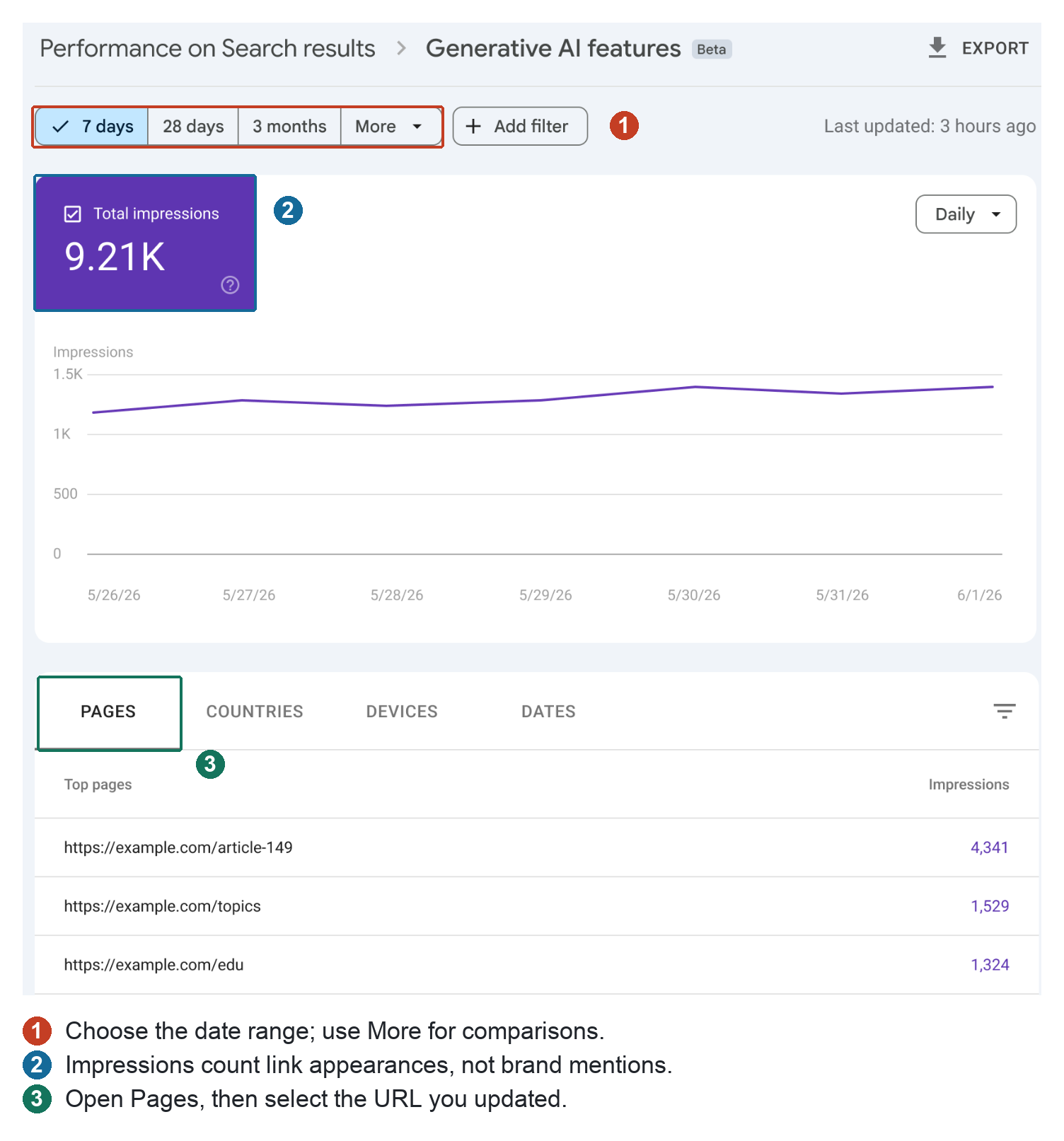
- Appearances in Google’s AI answers. In Search Console’s Generative AI performance report, open the Pages table and select a page you updated. Compare equal-length periods before and after the change, keeping country and device filters consistent. Impressions count appearances of links to your website, not unlinked brand mentions. The report combines AI Overviews and AI Mode without showing the triggering keywords, so use your keyword checks to understand the answers themselves. If the report is missing, your site may have too few impressions or be excluded through the setting covered in step 2.
- Source: Google’s report announcement.
- Search traffic to the updated pages: In Search Console’s Search results report, select a page under Pages, then open Queries to see its keywords, impressions, and clicks. Compare equal-length periods to see if more people are finding and visiting the page. These figures include AI Overview activity without isolating it, so they describe broader search performance. If impressions increase but clicks don’t, inspect the keywords gaining visibility and their search results. Consider what your page offers that buyers still need after reading Google’s answer. Google’s counting rules explain how it measures these interactions.

- Source: Semrush’s Search Console guide.
- Qualified inquiries and sales. Use your analytics and sales records to track inquiries attributed to organic search, opportunities accepted by sales, and closed deals. Give recent inquiries time to move through your usual sales cycle. If inquiries come from buyers your product can’t serve, revisit your keyword priorities. If suitable buyers repeatedly ask questions your pages leave unanswered, add those explanations. Keep these business results separate from your AI visibility figures; don’t label revenue “AI Overview revenue” unless your tracking can identify that source.
How Kairos Labs helps
If you need a SaaS SEO agency to help choose which pages to create or improve, our four-week Pipeline Strategy Sprint uses audience and competitor research to identify keyword priorities. You’ll receive a three-month editorial calendar and a plan for tracking search visibility, leads, and sales opportunities. We also track your LLM visibility: how AI platforms describe your brand when answering relevant buyer questions. See how CertifID built an organic content engine that drives 31% more pipeline.
Let’s build something great. Book a strategy call.
Let's design a solid SEO/AEO strategy and execute it so you get ahead of your competitors.
Book a call