


Key takeaways
- When buyers don't know your category name, start with the problems and workarounds they describe, then check how they search
- Consider a low-volume keyword when customers repeatedly ask about the problem and your product can help solve it
- Group keywords by what searchers want to know, then prioritize keywords about problems your product helps solve
- Next, target questions buyers ask about how to complete a task, which tools to compare, and how they could use your product
Standard keyword research for SaaS starts with category terms like "(category) software," X alternatives, and X pricing articles. But when buyers can't associate a term with your product yet, they can’t search for it, and keyword tools return little to no useful data to help you optimize your website for those terms.
Your buyers are likely searching for the problem they need to solve instead. And in this article, we'll explain how to optimize your content around those queries to gain market share in a relatively new category. Doing this well also helps you rank in AI Overviews when Google generates an answer.
How to do SaaS keyword research beyond the category name
The best way to do keyword research for SaaS in a new category is to start with sales conversations or customer feedback and a spreadsheet, whether you run in-house or agency SEO. To explore the phrases/queries from these conversations, you need Ahrefs Keywords Explorer, Site Explorer (to analyze competitors, and Google Search Console. These can help you find insights and opportunities to optimize for.

1. Collect the words buyers use for the problem
If you’re just getting started, you may not have any customer calls to use as context. In this case, you may need to talk to people in your circle who might need your product and ask how they’d define the problem it solves (provided they’re still doing things the “hard way”).
But this is for product-market fit, and you should’ve figured it out before doing any marketing.
Once you have an actual solution and have gone through the discovery phase, you can use insights from customer calls (or even sales calls) to understand what people are saying about the problem and how they describe it.
Pull exact phrases from discovery calls, lost-deal notes, support tickets, and onboarding answers. Look for what triggered their search for a tool and what the person used before.
You can also use customer reviews and relevant community discussions to find actual customer language as seed keywords to help with your keyword research.
Afterward, add each buyer phrase to a separate row in your spreadsheet, along with its source, the person’s role, their task, and their current workaround. You’ll also want to note how many different customer or prospect companies reported the same problem, even if they used different words. This helps you distinguish a recurring problem from one customer raising it several times.
Finally, create a separate column for candidate keywords. A sentence someone says on a call isn't necessarily what they'd type into Google. For example, if you sell a product that checks whether API docs match software releases, that candidate keyword can look like:

These phrases are hypothetical, but we’ll analyze the candidate keyword “API documentation testing” below to see how we can find keywords from it.
To start, if you have access to your Search Console data, open the Search results Performance report and set a relevant date range and target country. Use Google's regex filter to find question phrasing:
- Choose + Add filter → Queries → Custom (regex).
- Keep Matches regex selected and enter this expression:
^(how|why|what|when|where|who)\b
- Apply the filter and review the Queries table, then copy relevant keywords into your spreadsheet with the date range and impressions.
This filter only finds queries beginning with how, why, what, when, where, or who. These can help you know which searches you’re currently ranking for.
Once you’ve reviewed those questions, remove the filter and look for other useful queries, including ones containing “alternative” or “vs.” Those can help you find tools buyers are comparing, which the question filter would miss.
A keyword missing from Search Console may still be worth investigating. The report only shows queries where your site appeared, and Google leaves some queries out to protect users’ privacy. Keep the phrases you found in customer conversations, even if they don’t appear in this report.
2. Expand the list around problems and existing alternatives
Next, use the buyer phrases you collected to explore different ways someone might search for help. For the API documentation example, you could investigate:
- The problem they want to fix: keeping documentation up to date after a release
- The task they need to complete: checking whether API documentation matches how the API works
- The workaround they currently use: following a documentation checklist before each release
- The tools they might consider: comparing software for creating and maintaining API documentation
These are starting ideas for your research. To find related keyword suggestions in Ahrefs, we’ll start with “API documentation” and look for terms that also contain “testing.”
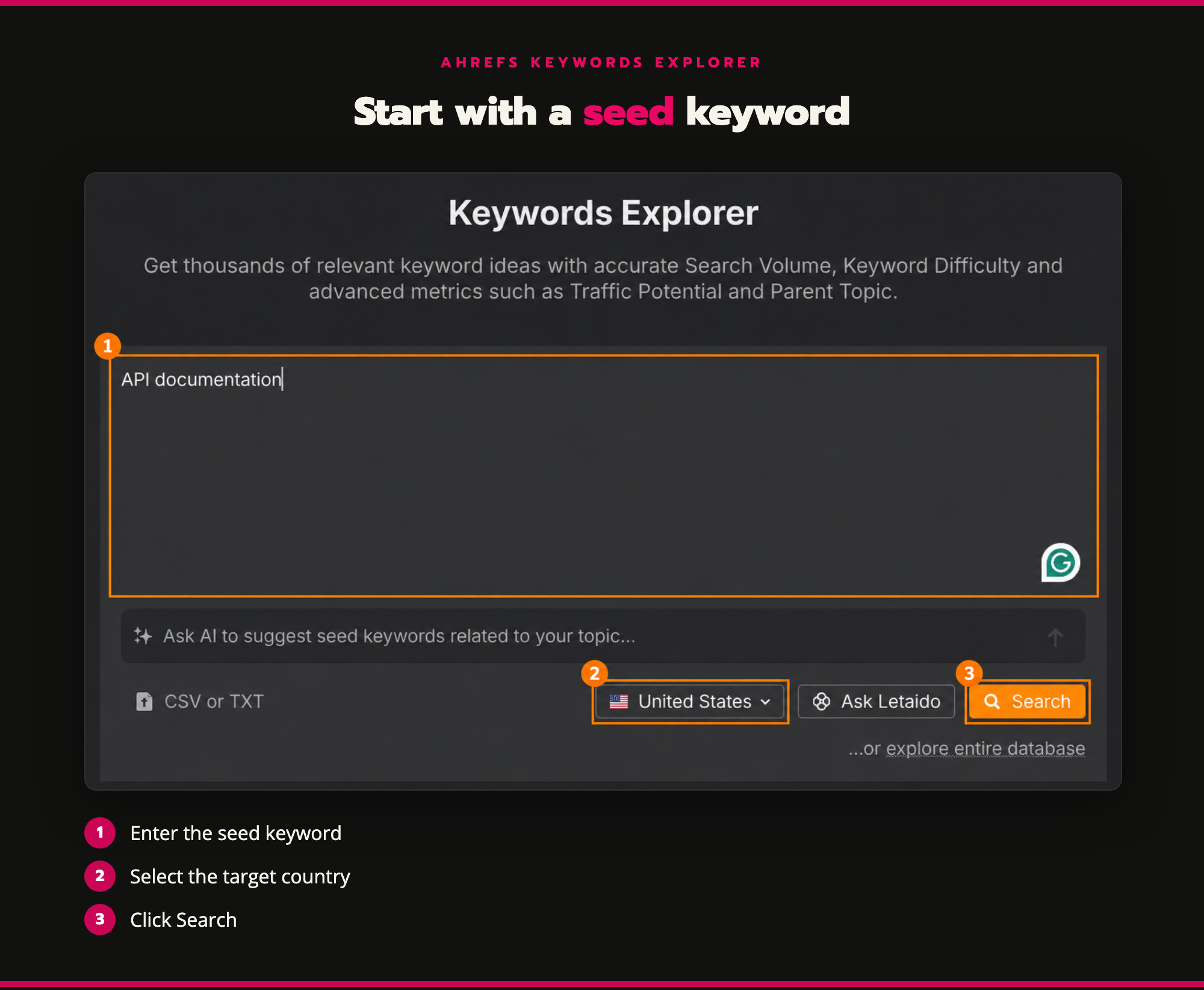
A. Open Keywords Explorer. Enter your keyword (in our case, it’s “API documentation”) in the keyword box, select the United States or your preferred target country, then click Search.
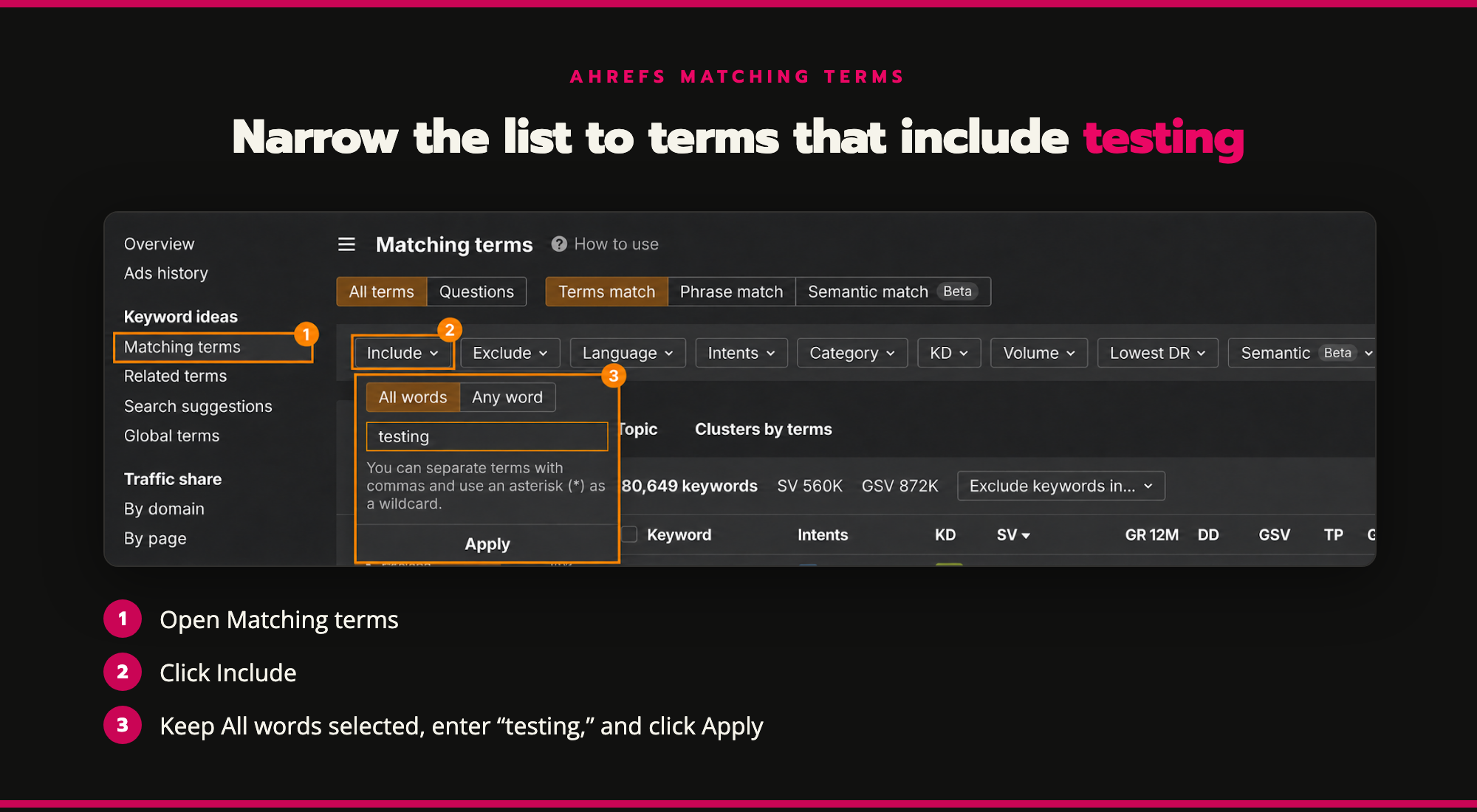
B. In the left sidebar, open Matching terms. Keep Terms match selected. Click Include, leave All words selected, enter “testing,” and click Apply.
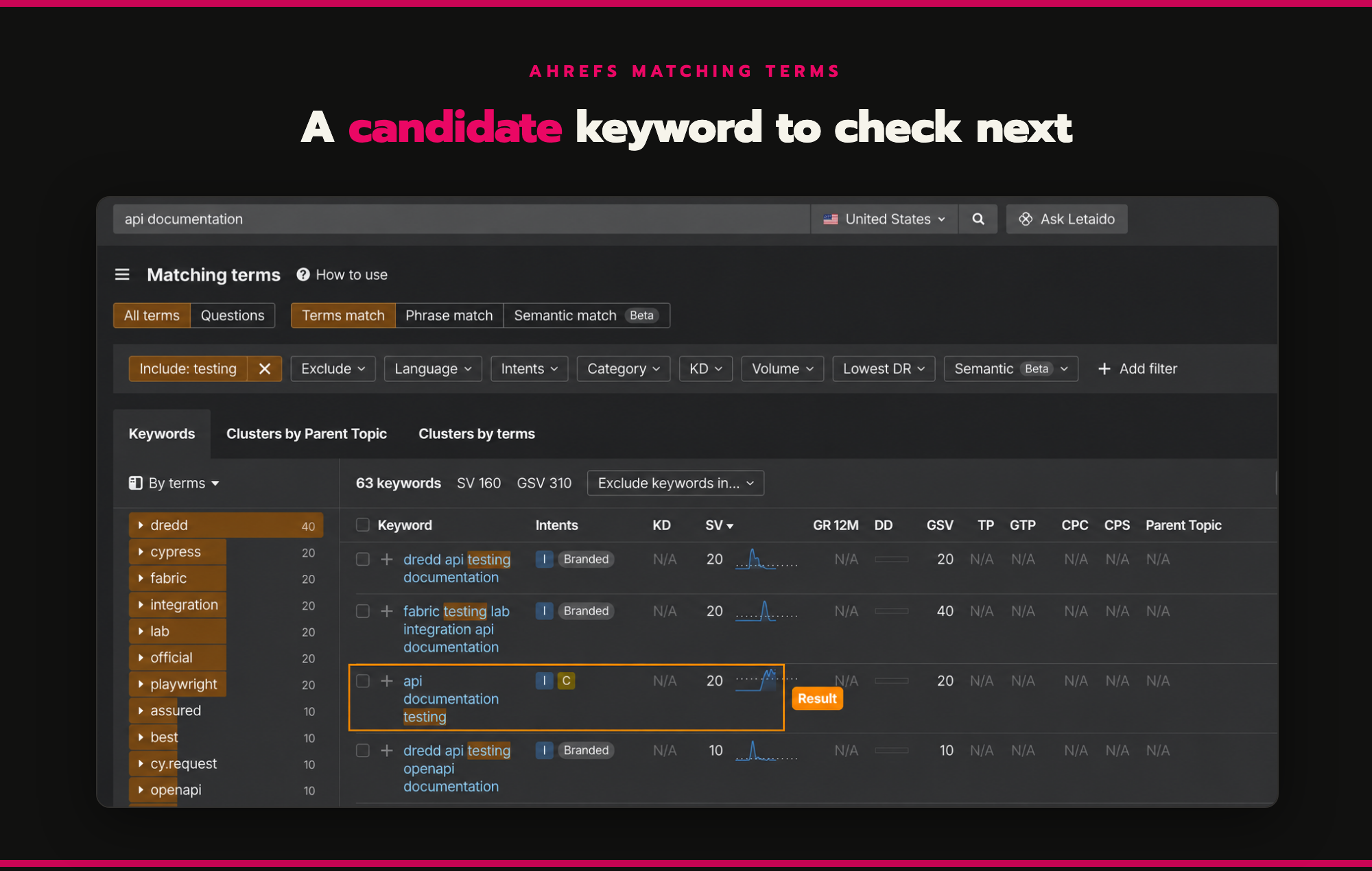
C. Click Show results below the filters. Look for keywords that might describe a problem your product helps solve, and add them to your spreadsheet. For each keyword, record the country, estimated monthly search volume, Keyword Difficulty (KD), and date checked. These are the keywords you will review on the search results page to see if they have any traction before deciding to create content for them.
Another way to find keyword ideas is to check which keywords existing articles rank for. For example, if your product checks whether API documentation is accurate, look for guides that teach people how to review that documentation manually.
Copy those links into a spreadsheet and use Ahrefs to see the keywords those guides rank for. Here’s how:
- Copy that page’s URL into Ahrefs Site Explorer, choose Exact URL, and run the search. This keeps the report focused on that page.
- Open Organic keywords under Organic search, then select your target country.
- Look for keywords about problems your product solves or tasks it helps people complete. Add those to your spreadsheet. Skip unrelated queries and searches intended to reach that company’s login or support pages.
These are keywords you can potentially optimize for, especially if your product can help the reader achieve an outcome you’re writing about.
If you don’t have a paid keyword tool, search the phrases from your spreadsheet in traditional Google search. Look through the ranking pages’ headings and the People Also Ask questions for related topics. As you type a phrase into Google, note any relevant autocomplete suggestions too, because it gives you an idea of what people are searching for.
3. Check search intent before deciding what content to create
Search intent means what someone wants to learn or do when they enter a keyword. To investigate it, search each keyword you’re considering and open the first five organic results.
As you read, record each page’s URL, the page type (a product landing page, a listicle, or a how-to guide), and the question it answers.
If several ranking pages compare tools or describe products, searchers may be trying to decide which tool to use, and Google is giving them that choice. If the results are mostly how-to guides, it might mean that searchers want to know how to complete a task (usually a job to be done). When both appear, read closely to understand what each page helps the reader do.
Don’t make that decision from titles alone. A page can use the same words as your keyword while answering a different question.
For our example, my search for “API documentation testing” returned Postman, PractiTest, GeeksforGeeks, IBM, and Splunk among the first five organic results. All five were how-to guides to API testing as a whole. They didn’t focus on whether an API doc accurately describes how an API works.
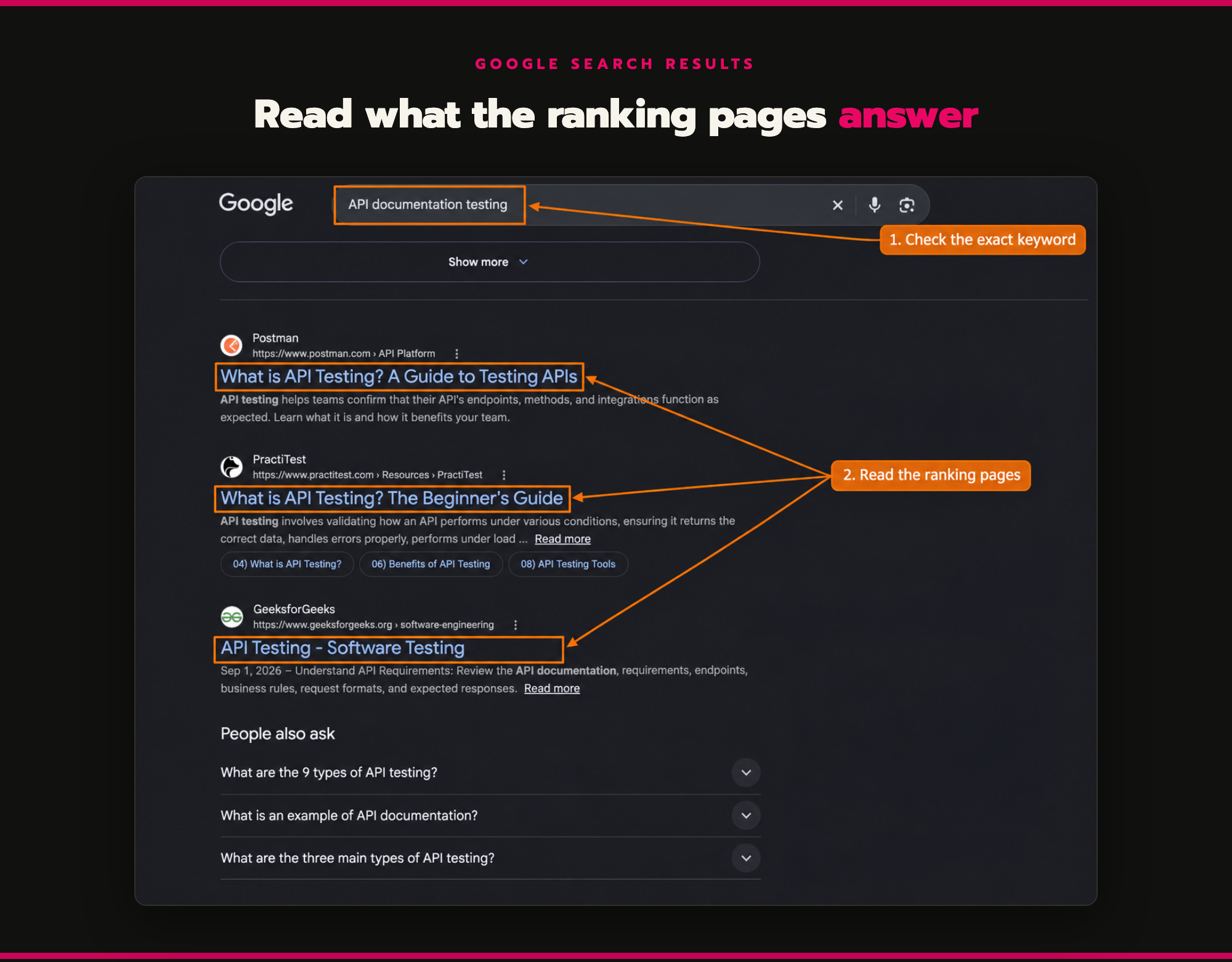
Based on these results, we wouldn’t create a page focused only on checking API documentation for this keyword yet. The pages we reviewed suggest that searchers may expect help with API testing more broadly, so optimizing for a product landing page about API documentation testing software would be a mismatch.
If your team has the expertise to write a useful API-testing guide, automated API documentation checks could be one of its sections. This can help you meaningfully plug your product’s context into an article that already meets search intent. Accurate, intent-matched pages also help you rank on ChatGPT and other AI assistants.
Once you’ve reviewed the results, add a Decision column to your spreadsheet and mark each keyword as Keep, Hold, or Drop, with a few sentences on why:
- Keep: You understand what searchers want, your product helps with that problem, and your team can create the kind of page they need
- Hold: You still need to clarify what searchers mean or whether your team can answer the question. Note what you’ll investigate next
- Drop: The results are for a different problem or audience, and your team (and product) can’t help

4. Decide which low-volume keywords deserve to be optimized for
Before creating a new page for a low-volume keyword, look for signs that customers need help with the problem. Have they asked about it in sales calls, support tickets, or customer interviews?
Then review your existing content. A content audit shows which article already covers the topic; if a short additional section would answer the question fully, update that article. Create a separate page when the question needs a fuller answer that would steer an existing article away from its main topic.
If you haven’t seen customers ask about the problem and have little search data to work with, ask customers how they handle such a task before spending time writing about it in a new article.
Use the questions below to decide which low-volume keywords to cover and which need a separate page:
- Do buyers ask about the problem? Look back at your customer notes. Check whether your target users have raised it and why they wanted it solved
- Can you answer what searchers want to know? Review the ranking pages. If people want a practical how-to guide, your team needs to be able to explain and demonstrate the task
- Could one page answer what people want to know when they search either keyword? Compare the ranking URLs. If several pages appear for the same keyword, read them to see how they cover both topics. Then decide if one article can give readers a complete answer to both questions
- Do you already have a page covering it? Check that page’s Search Console queries, impressions, and clicks. Look for relevant questions you could answer more fully before commissioning another article

For example, if Google Trends has enough data for the term, use it to see how interest changes over time. Its chart shows relative interest, not the number of searches, but it can help you decide if there’s enough interest to make the query worth optimizing for.
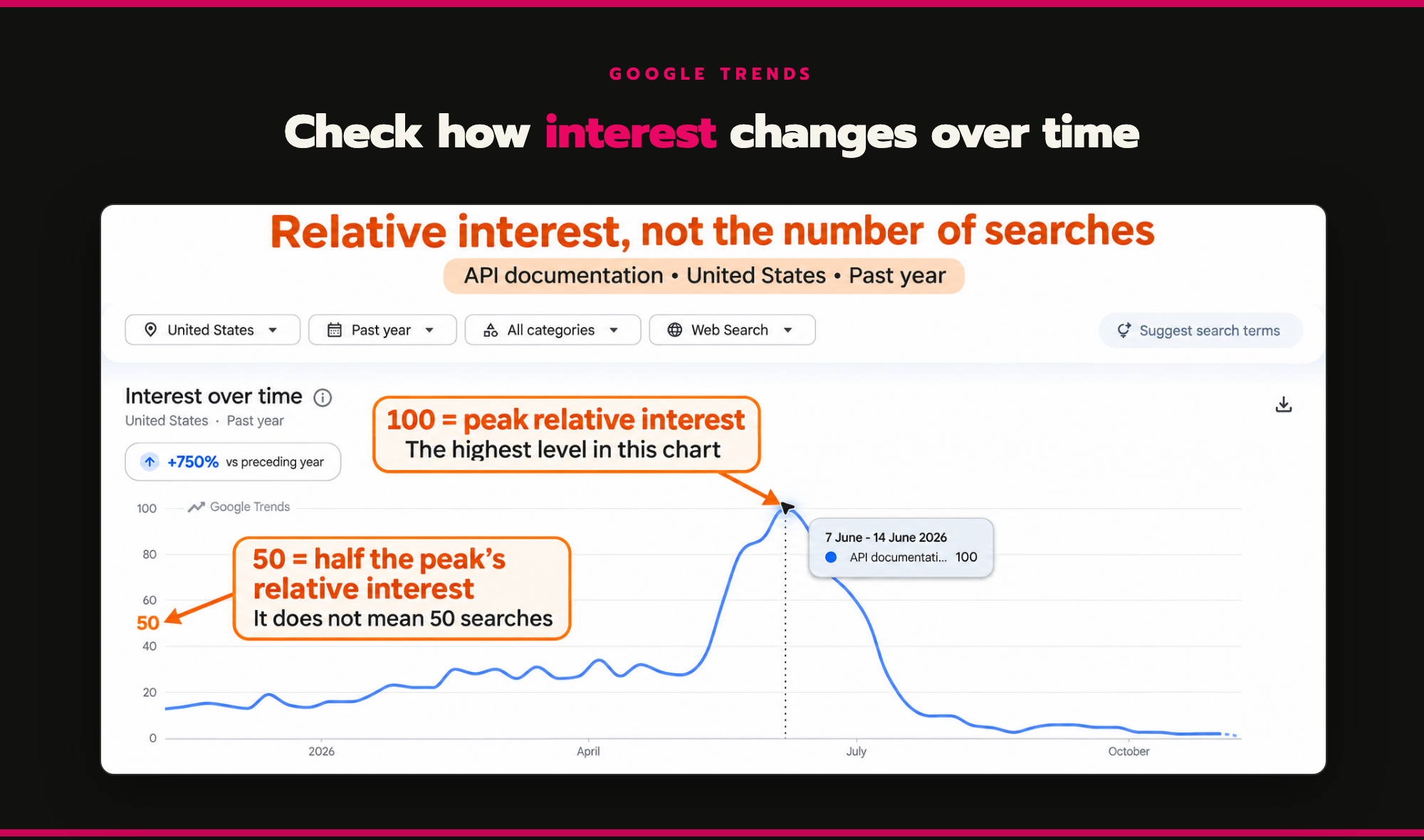
Be careful with very small topics, though: Google says low-volume terms can appear as zero, and fluctuations can be more noticeable when there’s little data. A single spike isn’t enough reason to commission an article; compare it with the customer questions and search results you’ve already reviewed.
5. Group related keywords and choose which pages to create first
When you have all potential keywords, group them according to what the searcher wants to know. Then check whether one page could answer the questions in each group clearly and fully.
Once you’ve decided which keywords to pursue, create a second spreadsheet tab for the kind of content you want to create. Use one row per page, with columns for its main keyword, related keywords, the question it will answer, its existing or proposed URL, its format, and the work required.
You should also check existing pages before commissioning new ones to avoid keyword cannibalization, especially if you outsource content marketing.
6. Use search query data to update your keyword map
Once your article has been published and indexed, use Search Console to see the queries it appeared for and the clicks they brought. Use that data to find questions you could answer more clearly or cover in a new article. Publishing pages that answer those queries clearly can also improve your LLM visibility, because AI platforms often reuse the same content.
- Open the Search results Performance report and clear any query filters. Select your country and date range. Below the chart, open Pages, click your article’s URL, then switch to Queries.

The page can look like this:
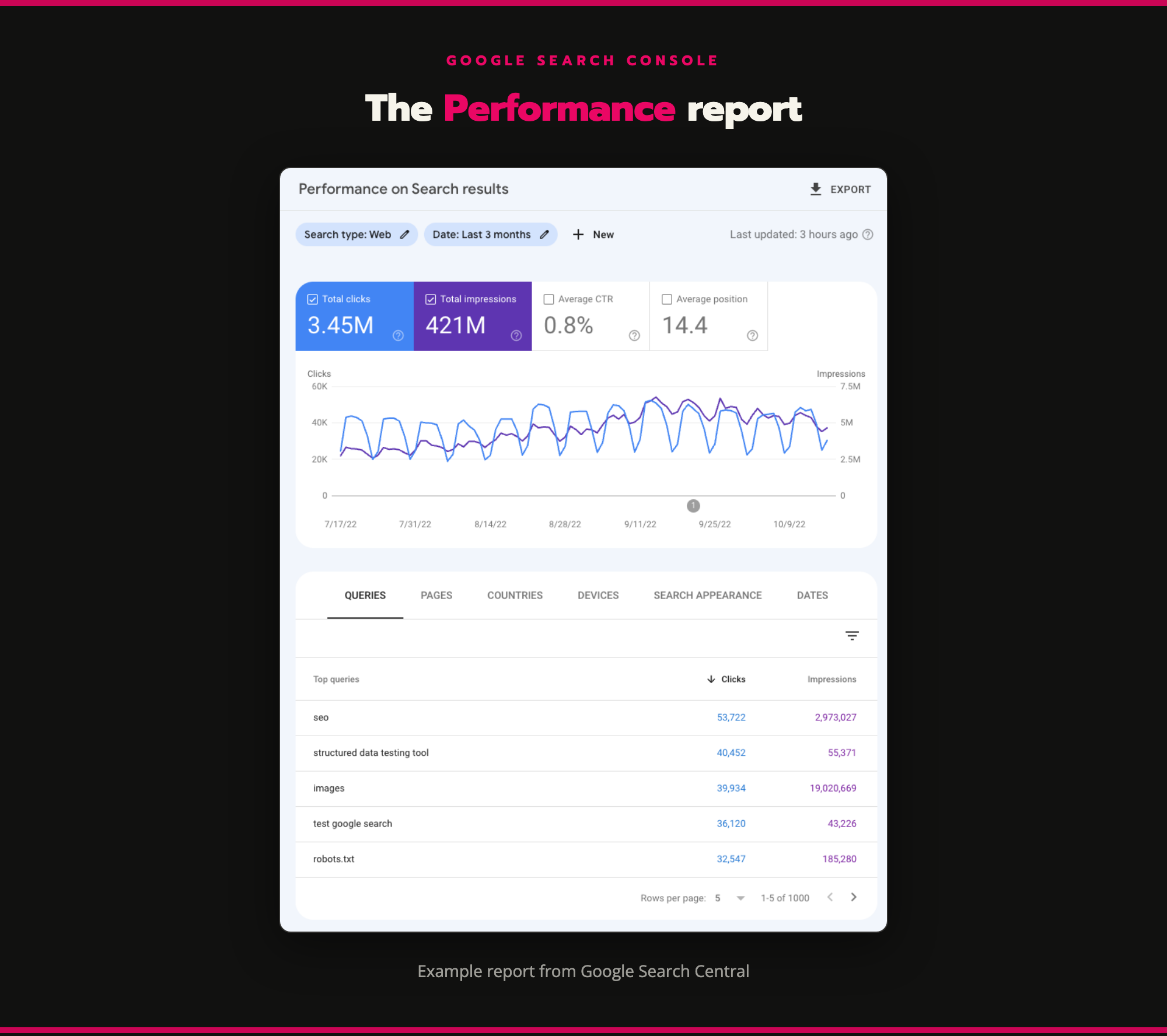
- Turn on Average position above the chart. Add useful queries to your keyword spreadsheet, one per row, with their impressions, clicks, average position, and date range. In an Action column, write what you’ll change and why. If you haven’t answered a question in the article, you can specify the section you’ll add it to (or improve).
- After updating the article, keep its page filter selected and use the date filter’s Compare option to compare equal periods before and after your changes. Keep the country and device filters the same, then review impressions and clicks for the queries you targeted.
You should also consider seasonal interest and other site changes before attributing an increase to your edits. If there’s too little data to judge, add a review date to your spreadsheet and check again later.
Choose your next content priorities with Kairos Labs
If you need a SaaS SEO agency to help choose which pages to create, we first learn how your product works and what buyers need from it. We watch product demos, review sales-call material, and interview subject-matter experts to understand the problems buyers describe (in their words).
Our Pipeline Strategy Sprint turns that research into a plan for SEO and AI search. We group related topics, set out which articles to publish first, and define what success looks like.
See how CertifID built an organic content engine that drives 31% more pipeline.
If you're deciding where to start, book a strategy call to discuss how we'd approach your market and prioritize the pages.
Let's design a solid SEO/AEO strategy and execute it so you get ahead of your competitors.
Book a call